


How to unblock M6+ with Proton VPN
- पढ़ने का समय
- 2 मिनट
- श्रेणी
- स्ट्रीम गाइड
M6+ (was 6play) is a French catch-up television streaming service created by a media group in France called the M6 Group. This streaming service has content from seven TV channels to stream: M6, W9, 6ter, Gulli, Paris Première, Téva, and Le Live by M6+.
This article will explain how you can use Proton VPN to watch M6+:

आप Proton VPN का इस्तेमाल करके फ्रांस भर की दूसरी पॉपुलर स्ट्रीम सर्विस को भी अनब्लॉक कर सकते हैं, जिनमें Canal+, France.tv, और Netflix, Disney+, और Amazon Prime Video का फ्रेंच संस्करण शामिल है।
हमारी स्ट्रीम गाइड में उन सभी स्ट्रीम सर्विस की लिस्ट दी गई है जिन्हें हम सपोर्ट करते हैं।
How to watch M6+ with Proton VPN from your browser
1. अगर आपने अभी तक ऐसा नहीं किया है, तो आपको अपने डिवाइस के लिए Proton VPN डाउनलोड और इंस्टॉल करना होगा।
- Windows के लिए Proton VPN(नई विंडो)
- macOS के लिए Proton VPN(नई विंडो)
- Linux के लिए Proton VPN(नई विंडो)
2. Proton VPN के ज़रिए स्ट्रीम सर्विस इस्तेमाल करने के लिए, आपको एक पेड Proton VPN प्लैन की ज़रूरत होगी। अगर आपके पास पहले से Free प्लैन है, तो साइनइन करके अपने खाते को अपग्रेड करें और अपने खाते के सदस्यता पेज से मनचाहा प्लैन चुनें।
अगर आपके पास Proton VPN खाता नहीं है, तो आप यहां से Plus या Unlimited प्लैन के लिए साइनअप कर सकते हैं(नई विंडो)।
3. Proton VPN में लॉगइन करें और फ्रांस में स्थित किसी भी सर्वर से कनेक्ट करें।
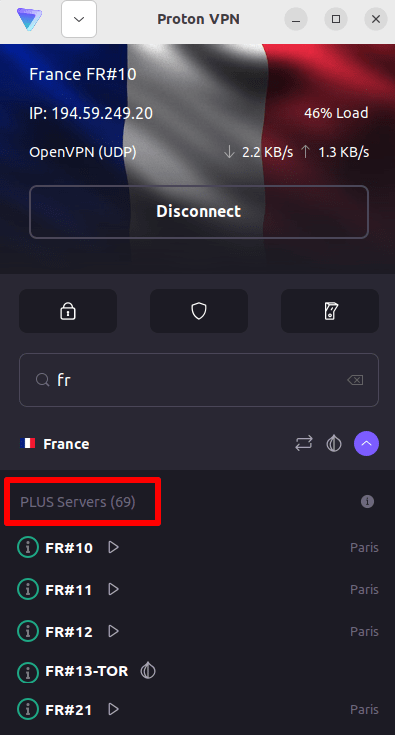
4. Visit the M6+ website at https://www.m6.fr/ and sign up for an account. You do not need a paid subscription to stream content from M6+, although there are paid options available for those who want to stream premium content.
5. Sign in to your M6+ account and choose your favorite live or catch-up television to start streaming securely with Proton VPN!
How to watch M6+ with Proton VPN on iOS and Android
1. अगर आपने अभी तक ऐसा नहीं किया है, तो आपको अपने डिवाइस के लिए Proton VPN डाउनलोड और इंस्टॉल करना होगा।
2. Proton VPN के ज़रिए स्ट्रीम सर्विस इस्तेमाल करने के लिए, आपको एक पेड Proton VPN प्लैन की ज़रूरत है। अगर आपके पास पहले से Free प्लैन है, तो साइनइन करके अपने खाते को अपग्रेड करें और अपने खाते के सदस्यता पेज से मनचाहा प्लैन चुनें।
अगर आपके पास Proton VPN खाता नहीं है, तो आप यहां से Plus या Unlimited प्लैन के लिए साइनअप कर सकते हैं(नई विंडो)।
3. Proton VPN में लॉगइन करें और फ्रांस में स्थित किसी भी सर्वर से कनेक्ट करें।

4. Download the M6+ app and create an account. You do not need a paid subscription to start streaming with M6+. However, there are paid subscriptions for those who want to access premium content.
Note: The M6+ iOS app(नई विंडो) and the M6+ Android app(नई विंडो) are not available in all countries.
5. Sign in to your M6+ account, and start streaming live French TV or catch-up with your favorite French shows securely!
How to watch M6+ with Proton VPN on Android TV
1. To watch M6+ using Proton VPN on your Android TV, you first need to download the Android TV Proton VPN app(नई विंडो). For instructions on setting up Android TV and connecting to the right server, take a look at our Android TV support guide.
2. अपने Android TV डिवाइस का इस्तेमाल करके फ्रांस में स्थित किसी सर्वर से कनेक्ट करें।
हमारे Plus सर्वर से कनेक्ट करने के लिए, आपको एक पेड Proton VPN प्लैन की ज़रूरत है। अगर आपके पास पहले से Free प्लैन है, तो साइनइन करके अपने खाते को अपग्रेड करें और अपने खाते के सदस्यता पेज से मनचाहा प्लैन चुनें।
अगर आपके पास Proton VPN खाता नहीं है, तो आप यहां से Plus या Unlimited प्लैन के लिए साइनअप कर सकते हैं(नई विंडो)।
3. Install the M6+ app(नई विंडो) on your Android TV device and create an account if you don’t already have one. You do not need a paid subscription to start streaming with M6+. However, there are paid subscriptions available for those who want to access premium content.
4. Open the M6+ app and log in to your account. You can now start watching all your favorite French TV shows securely with Proton VPN!
Troubleshooting M6+ streaming problems
If M6+ does not work after following the above steps, try the following troubleshooting options.
- Proton VPN ऐप को वापिस शुरु करें और एक नया VPN कनेक्शन शुरू करें।
- If you are accessing M6+ via your browser, try clearing your browser cache(नई विंडो).
- अपने डिवाइस को वापिस शुरु करें।
- अपना DNS कैश हटाएं (Windows, Mac, या Linux)।
अगर इनमें से कोई भी विकल्प काम नहीं करता, तो कृपया हमारी स्ट्रीम समस्या निवारण गाइड देखें या हमारी सहायता टीम से संपर्क करें(नई विंडो)।