


如何使用 Proton VPN 解鎖 M6+
- 閱讀
- 1 分鐘
- 類別
- 串流指南
M6+(前身為 6play)是由法國名為 M6 Group 的媒體集團所建立的法國電視回看串流服務。此串流服務提供來自七個電視頻道的串流內容:M6、W9、6ter、Gulli、Paris Première、Téva 和 Le Live by M6+。
本文將說明如何使用 Proton VPN 來觀看 M6+:

您也可以使用 Proton VPN 解除封鎖法國其他熱門的串流服務,包含 Canal+、France.tv,以及法國版本的 Netflix、Disney+ 和 Amazon Prime Video。
我們的串流指南列出了我們支援的所有串流服務。
如何透過您的瀏覽器使用 Proton VPN 觀看 M6+
1. 如果您尚未安裝,您需要為您的裝置下載並安裝 Proton VPN。
2. 若要透過 Proton VPN 使用串流服務,您將需要付費的 Proton VPN 方案。如果您已擁有 免費 方案, 升級您的帳號:登入並在您帳號的 訂閱 頁面選取所需的方案。
如果您沒有 Proton VPN 帳號,可以在此註冊進階 (Plus) 或 Unlimited 方案(新視窗)。
3. 登入 Proton VPN 並連線至位於法國的任何伺服器。
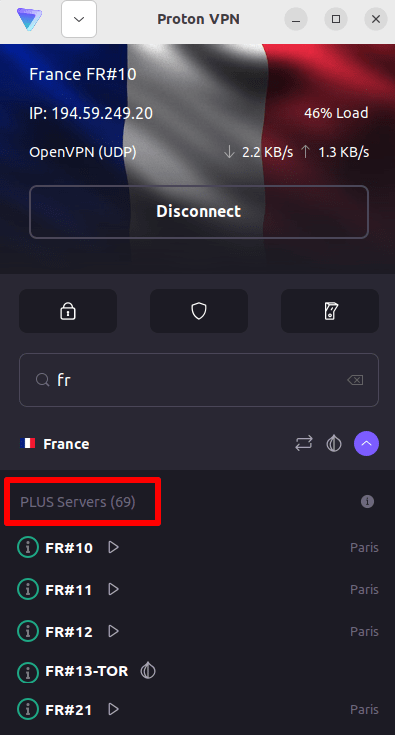
4. 前往 M6+ 網站 https://www.m6.fr/ 並註冊帳號。您不需要付費訂閱即可從 M6+ 串流觀看內容,不過若想串流觀看高級內容,也有付費選項可供選擇。
5. 登入您的 M6+ 帳號,然後選擇您最愛的直播或回看電視節目,開始使用 Proton VPN 安全地進行串流播放!
如何在 iOS 和 Android 上使用 Proton VPN 觀看 M6+
1. 如果您尚未安裝,您需要為您的裝置下載並安裝 Proton VPN。
2. 若要透過 Proton VPN 使用串流服務,您需要付費的 Proton VPN 方案。如果您已擁有 免費 方案, 升級您的帳號:登入並在您帳號的 訂閱 頁面選取所需的方案。
如果您沒有 Proton VPN 帳號,可以在此註冊進階 (Plus) 或 Unlimited 方案(新視窗)。
3. 登入 Proton VPN 並連線至位於法國的任何伺服器。

4. 下載 M6+ 應用程式並創建新帳號。您不需要付費訂閱即可開始在 M6+ 進行串流。不過,針對想要存取高級內容的使用者,也提供付費訂閱。
請注意:M6+ iOS 應用程式(新視窗)和 M6+ Android 應用程式(新視窗)並未在所有國家提供。
5. 登入您的 M6+ 帳號,然後開始安全地串流播放法國電視直播或回看您最愛的法國節目!
如何在 Android TV 上使用 Proton VPN 觀看 M6+
1. 若要在 Android TV 上使用 Proton VPN 觀看 M6+,您首先需要下載 Android TV Proton VPN 應用程式(新視窗)。如需設定 Android TV 並連線至正確伺服器的說明,請參閱我們的 Android TV 支援指南。
2. 使用您的 Android TV 裝置連線至位於法國的伺服器。
若要連線至我們的進階 (Plus) 伺服器,您需要付費的 Proton VPN 方案。如果您已擁有 免費 方案, 升級您的帳號:登入並在您帳號的 訂閱 頁面選取所需的方案。
如果您沒有 Proton VPN 帳號,可以在此註冊進階 (Plus) 或 Unlimited 方案(新視窗)。
3. 在您的 Android TV 裝置上安裝 M6+ 應用程式(新視窗),如果您還沒有帳號,請創建新帳號。您不需要付費訂閱即可開始在 M6+ 進行串流。不過,針對想要存取高級內容的使用者,也有提供付費訂閱。
4. 開啟 M6+ 應用程式並登入您的帳號。您現在可以開始使用 Proton VPN 安全地觀看所有您最愛的法國電視節目了!
M6+ 串流問題疑難排解
如果按照上述步驟操作後 M6+ 仍無法運作,請嘗試以下疑難排解做法。
- 重新啟動 Proton VPN 應用程式並建立新的 VPN 連線。
- 如果您是透過瀏覽器存取 M6+,請嘗試清除您的瀏覽器快取(新視窗)。
- 重新啟動您的裝置。
- 清除您的 DNS 快取 (Windows、Mac 或 Linux)。
如果這些選項都無法解決問題,請參閱我們的串流疑難排解指南,或聯絡我們的支援團隊(新視窗)。