


Cómo desbloquear M6+ con Proton VPN
- Lectura
- 4 minutos
- Categoría
- Guías de streaming
M6+ (antes 6play) es un servicio de streaming de televisión a la carta francés creado por un grupo de medios de Francia llamado M6 Group. Este servicio de streaming tiene contenido de siete canales de televisión para streamear: M6, W9, 6ter, Gulli, Paris Première, Téva y Le Live de M6+.
Este artículo le explicará cómo puede usar Proton VPN para ver M6+:

También puede usar Proton VPN para desbloquear otros servicios de streaming populares de toda Francia, como Canal+, France.tv y la versión francesa de Netflix, Disney+ y Amazon Prime Video.
Nuestra guía de streaming incluye todos los servicios de streaming que cuentan con nuestro soporte.
Cómo ver M6+ con Proton VPN desde su navegador
1. Si aún no lo ha hecho, debe descargar e instalar Proton VPN para su dispositivo.
- Proton VPN para Windows(nueva ventana)
- Proton VPN para macOS(nueva ventana)
- Proton VPN para Linux(nueva ventana)
2. Para usar los servicios de streaming a través de Proton VPN, necesitará un plan de pago de Proton VPN. Si ya tiene un plan Gratuito, actualice su cuenta iniciando sesión y seleccionando el plan que desee desde la página de Suscripción de su cuenta.
Si no tiene una cuenta de Proton VPN, puede registrarse para obtener un plan Plus o Unlimited aquí(nueva ventana).
3. Inicie sesión en Proton VPN y conéctese a cualquier servidor ubicado en Francia.
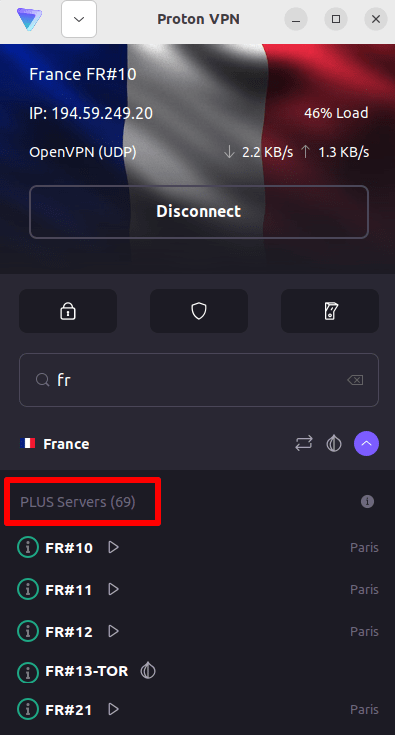
4. Visite el sitio web de M6+ en https://www.m6.fr/ y regístrese para obtener una cuenta. No necesita una suscripción paga para streamear contenido de M6+, aunque hay opciones pagas disponibles para quienes deseen streamear contenido premium.
5. ¡Inicie sesión en su cuenta de M6+ y elija su televisión en vivo o a la carta favorita para comenzar a streamear de forma segura con Proton VPN!
Cómo ver M6+ con Proton VPN en iOS y Android
1. Si aún no lo ha hecho, debe descargar e instalar Proton VPN para su dispositivo.
2. Para usar los servicios de streaming a través de Proton VPN, necesita un plan de pago de Proton VPN. Si ya tiene un plan Gratuito, actualice su cuenta iniciando sesión y seleccionando el plan que desee desde la página de Suscripción de su cuenta.
Si no tiene una cuenta de Proton VPN, puede registrarse para obtener un plan Plus o Unlimited aquí(nueva ventana).
3. Inicie sesión en Proton VPN y conéctese a cualquier servidor ubicado en Francia.

4. Descargue la aplicación de M6+ y cree una cuenta. No necesita una suscripción paga para comenzar a streamear con M6+. Sin embargo, hay suscripciones pagas disponibles para quienes deseen acceder a contenido premium.
Nota: la aplicación de M6+ para iOS(nueva ventana) y la aplicación de M6+ para Android(nueva ventana) no están disponibles en todos los países.
5. ¡Inicie sesión en su cuenta de M6+ y comience a streamear televisión francesa en vivo o en diferido con sus programas franceses favoritos de forma segura!
Cómo ver M6+ con Proton VPN en Android TV
1. Para ver M6+ usando Proton VPN en su Android TV, primero necesita descargar la aplicación de Proton VPN para Android TV(nueva ventana). Para obtener instrucciones sobre cómo configurar Android TV y conectarse al servidor adecuado, consulte nuestra guía de soporte de Android TV.
2. Conéctese a un servidor ubicado en Francia usando su dispositivo Android TV.
Para conectarse a nuestros servidores Plus, necesita un plan de pago de Proton VPN. Si ya tiene un plan Gratuito, actualice su cuenta iniciando sesión y seleccionando el plan que desee desde la página de Suscripción de su cuenta.
Si no tiene una cuenta de Proton VPN, puede registrarse para obtener un plan Plus o Unlimited aquí(nueva ventana).
3. Instale la aplicación M6+(nueva ventana) en su dispositivo Android TV y cree una cuenta si aún no tiene una. No necesita una suscripción paga para comenzar a streamear con M6+. Sin embargo, hay suscripciones pagas disponibles para quienes deseen acceder a contenido premium.
4. Abra la aplicación M6+ e inicie sesión en su cuenta. ¡Ahora puede comenzar a ver todos sus programas de televisión franceses favoritos de forma segura con Proton VPN!
Resolución de problemas de streaming de M6+
Si M6+ no funciona después de seguir los pasos anteriores, intente con las siguientes opciones de resolución de problemas.
- Reinicie la aplicación Proton VPN e inicie una nueva conexión VPN.
- Si está accediendo a M6+ a través de su navegador, intente borrar la caché de su navegador(nueva ventana).
- Reinicie su dispositivo.
- Borre su caché de DNS (Windows, Mac o Linux).
Si ninguna de estas opciones funciona, consulte nuestra guía de resolución de problemas de streaming o póngase en contacto con nuestro equipo de soporte(nueva ventana).