


Proton VPN으로 M6+ 차단을 해제하는 방법
- 읽기
- 1분
- 카테고리
- 스트리밍 서비스 가이드
M6+(이전 명칭: 6play)는 프랑스의 M6 Group이라는 미디어 그룹이 생성한 프랑스 다시보기 TV 스트리밍 서비스입니다. 이 스트리밍 서비스는 M6, W9, 6ter, Gulli, Paris Première, Téva, Le Live by M6+ 등 일곱 개 TV 채널의 스트림 콘텐츠를 제공합니다.
본 아티클에서는 귀하가 Proton VPN을 사용하여 M6+를 시청하는 방법을 설명합니다.

귀하는 Proton VPN을 사용하여 Canal+, France.tv 및 프랑스 버전 Netflix, Disney+ 및 Amazon Prime Video를 포함한 프랑스 전역의 다른 인기 스트리밍 서비스도 차단 해제할 수 있습니다.
Proton의 스트리밍 가이드에서 지원하는 전체 스트리밍 서비스 목록을 확인할 수 있습니다.
브라우저에서 Proton VPN으로 M6+를 시청하는 방법
1. 아직 다운로드하지 않으셨다면, 귀하의 기기에 맞는 Proton VPN을 다운로드하여 설치해야 합니다.
2. Proton VPN을 통해 스트리밍 서비스를 이용하려면 유료 Proton VPN 요금제가 필요합니다. 이미 무료 요금제를 사용 중이시라면, 계정을 업그레이드하기 위해 로그인한 후 계정의 구독 페이지에서 원하는 요금제를 선택해 주세요.
Proton VPN 계정이 없다면 여기에서 Plus 또는 Unlimited 요금제에 가입할 수 있습니다(새 창).
3. Proton VPN에 로그인하고 프랑스에 있는 서버에 연결합니다.
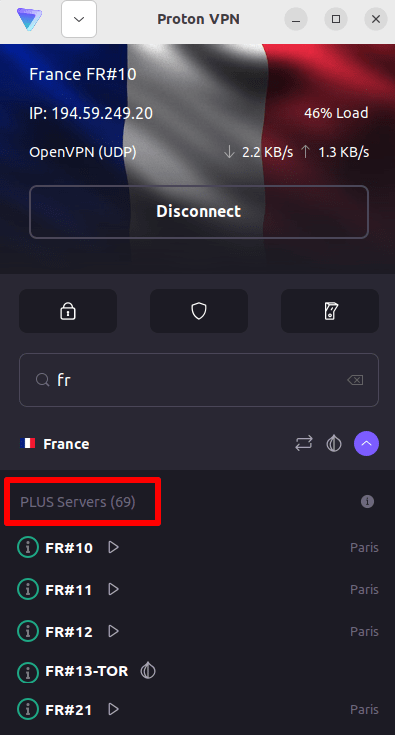
4. M6+ 웹사이트(https://www.m6.fr/)를 방문하여 계정에 가입하세요. 프리미엄 콘텐츠 스트림을 원하시는 분들을 위한 유료 결제 옵션이 제공되지만, 귀하께서 M6+ 콘텐츠를 스트림하기 위해 유료 구독을 하실 필요는 없습니다.
5. 귀하의 M6+ 계정에 로그인하고 선호하는 실시간 방송 또는 다시보기 TV를 선택하여 Proton VPN으로 안전하게 스트리밍 서비스를 시작해 보세요!
iOS 및 Android에서 Proton VPN으로 M6+를 시청하는 방법
1. 아직 다운로드하지 않으셨다면, 귀하의 기기에 맞는 Proton VPN을 다운로드하여 설치해야 합니다.
2. Proton VPN을 통해 스트리밍 서비스를 이용하려면 유료 Proton VPN 요금제가 필요합니다. 이미 무료 요금제를 사용 중이시라면, 계정을 업그레이드하기 위해 로그인한 후 계정의 구독 페이지에서 원하는 요금제를 선택해 주세요.
Proton VPN 계정이 없다면 여기에서 Plus 또는 Unlimited 요금제에 가입할 수 있습니다(새 창).
3. Proton VPN에 로그인하고 프랑스에 있는 서버에 연결합니다.

4. M6+ 앱을 다운로드하고 계정을 만드세요. M6+로 스트림을 시작하기 위해 유료 구독을 하실 필요는 없습니다. 하지만 premium 콘텐츠에 접근하려는 사용자를 위한 유료 구독 옵션이 있습니다.
참고: M6+ iOS 앱(새 창) 및 M6+ Android 앱(새 창)은 모든 국가에서 사용할 수 있는 것은 아닙니다.
5. 귀하의 M6+ 계정에 로그인하고, 선호하는 프랑스 프로그램을 실시간 프랑스 TV 또는 다시보기로 안전하게 스트림해 보세요!
Android TV에서 Proton VPN으로 M6+를 시청하는 방법
1. Android TV에서 Proton VPN을 사용하여 M6+를 시청하려면 우선 Android TV용 Proton VPN 애플리케이션을 다운로드(새 창)해야 합니다. Android TV 설정 및 올바른 서버 연결에 관한 지침은 저희 Android TV 지원 가이드를 참고하세요.
2. 귀하의 Android TV 기기를 사용하여 프랑스에 있는 서버에 연결합니다.
Plus 서버에 연결하려면 유료 Proton VPN 요금제가 필요합니다. 이미 무료 요금제를 사용 중이시라면, 계정을 업그레이드하기 위해 로그인한 후 계정의 구독 페이지에서 원하는 요금제를 선택해 주세요.
Proton VPN 계정이 없다면 여기에서 Plus 또는 Unlimited 요금제에 가입할 수 있습니다(새 창).
3. Android TV 기기에 M6+ 앱(새 창)을 설치하고, 계정이 없다면 계정 만들기를 진행하세요. M6+로 스트림을 시작하기 위해 유료 구독을 하실 필요는 없습니다. 하지만 premium 콘텐츠에 접근하려는 사용자를 위한 유료 구독 옵션이 제공됩니다.
4. M6+ 앱을 열고 계정에 로그인하세요. 이제 Proton VPN으로 선호하는 모든 프랑스 TV 프로그램을 안전하게 시청할 수 있습니다!
M6+ 스트리밍 서비스 문제 해결 방법
위 단계를 수행한 후에도 M6+가 작동하지 않는 경우, 다음 문제 해결 옵션을 시도해 보세요.
- Proton VPN 애플리케이션을 재시작하고 새로운 VPN 연결을 시작합니다.
- 브라우저를 통해 M6+에 접근하는 경우, 브라우저 캐시 비우기(새 창)를 시도해 보세요.
- 기기를 재시작합니다.
- DNS 캐시 비우기(Windows, Mac 또는 Linux)를 수행하세요.
이러한 옵션으로 해결되지 않는 경우, 스트리밍 서비스 문제 해결 가이드를 확인하거나 지원 팀에 문의(새 창)하세요.