


So entsperrst du M6+ mit Proton VPN
- Lesen
- 4 Min.
- Kategorie
- Streaming-Anleitungen
M6+ (ehemals 6play) ist ein französischer Catch-up-TV-Streamingdienst, der von einer Mediengruppe in Frankreich namens M6 Group erstellt wurde. Dieser Streamingdienst bietet Inhalte von sieben TV-Kanälen zum Streamen: M6, W9, 6ter, Gulli, Paris Première, Téva und Le Live by M6+.
In diesem Artikel wird erklärt, wie du Proton VPN verwenden kannst, um M6+ zu sehen:

Du kannst Proton VPN auch nutzen, um andere beliebte Streamingdienste aus ganz Frankreich freizuschalten, einschließlich Canal+, France.tv sowie der französischen Version von Netflix, Disney+ und Amazon Prime Video.
Unsere Streaming-Anleitung listet alle Streamingdienste auf, die wir unterstützen.
So siehst du M6+ mit Proton VPN über deinen Browser
1. Falls du es noch nicht getan hast, musst du Proton VPN für dein Gerät herunterladen und installieren.
- Proton VPN für Windows(neues Fenster)
- Proton VPN für macOS(neues Fenster)
- Proton VPN für Linux(neues Fenster)
2. Um Streamingdienste über Proton VPN zu nutzen, benötigst du ein kostenpflichtiges Proton VPN-Abonnement. Wenn du bereits ein kostenloses Abonnement hast, upgrade dein Konto, indem du dich anmeldest und das gewünschte Abonnement auf der Seite Abonnement deines Kontos auswählst.
Wenn du noch kein Proton VPN-Konto hast, kannst du dich hier für ein Plus- oder Unlimited-Abonnement registrieren(neues Fenster).
3. Melde dich bei Proton VPN an und verbinde dich mit einem beliebigen Server in Frankreich.
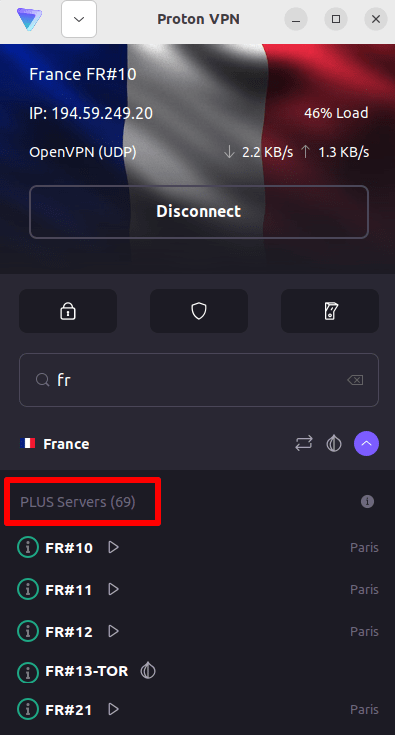
4. Besuche die M6+-Website unter https://www.m6.fr/ und registriere dich für ein Konto. Du benötigst kein kostenpflichtiges Abonnement, um Inhalte von M6+ zu streamen, obwohl kostenpflichtige Optionen für diejenigen verfügbar sind, die Premium-Inhalte streamen möchten.
5. Melde dich bei deinem M6+-Konto an und wähle dein bevorzugtes Live- oder Catch-up-TV, um das Streaming mit Proton VPN sicher zu starten!
So siehst du M6+ mit Proton VPN auf iOS und Android
1. Falls du es noch nicht getan hast, musst du Proton VPN für dein Gerät herunterladen und installieren.
2. Um Streamingdienste über Proton VPN zu nutzen, benötigst du ein kostenpflichtiges Proton VPN-Abonnement. Wenn du bereits ein kostenloses Abonnement hast, upgrade dein Konto, indem du dich anmeldest und das gewünschte Abonnement auf der Seite Abonnement deines Kontos auswählst.
Wenn du noch kein Proton VPN-Konto hast, kannst du dich hier für ein Plus- oder Unlimited-Abonnement registrieren(neues Fenster).
3. Melde dich bei Proton VPN an und verbinde dich mit einem beliebigen Server in Frankreich.

4. Lade die M6+-App herunter und erstelle ein Konto. Du benötigst kein kostenpflichtiges Abonnement, um das Streaming mit M6+ zu starten. Es gibt jedoch kostenpflichtige Abonnements für diejenigen, die auf Premium-Inhalte zugreifen möchten.
Hinweis: Die M6+ iOS-App(neues Fenster) und die M6+ Android-App(neues Fenster) sind nicht in allen Ländern verfügbar.
5. Melde dich bei deinem M6+-Konto an und beginne, französisches Live-TV oder Catch-up-TV mit deinen bevorzugten französischen Sendungen sicher zu streamen!
So siehst du M6+ mit Proton VPN auf Android TV
1. Um M6+ mit Proton VPN auf deinem Android TV zu sehen, musst du zuerst die Android TV Proton VPN-App herunterladen(neues Fenster). Anleitungen zur Einrichtung von Android TV und zum Herstellen einer Verbindung mit dem richtigen Server findest du in unserer Android TV-Supportanleitung.
2. Verbinde dich über dein Android TV-Gerät mit einem Server in Frankreich.
Um dich mit unseren Plus-Servern zu verbinden, benötigst du ein kostenpflichtiges Proton VPN-Abonnement. Wenn du bereits ein kostenloses Abonnement hast, upgrade dein Konto, indem du dich anmeldest und das gewünschte Abonnement auf der Seite Abonnement deines Kontos auswählst.
Wenn du noch kein Proton VPN-Konto hast, kannst du dich hier für ein Plus- oder Unlimited-Abonnement registrieren(neues Fenster).
3. Installiere die M6+-App(neues Fenster) auf deinem Android TV-Gerät und erstelle ein Konto, falls du noch keines hast. Du benötigst kein kostenpflichtiges Abonnement, um das Streaming mit M6+ zu starten. Es sind jedoch kostenpflichtige Abonnements für diejenigen verfügbar, die auf Premium-Inhalte zugreifen möchten.
4. Öffne die M6+-App und melde dich bei deinem Konto an. Du kannst jetzt beginnen, all deine bevorzugten französischen TV-Sendungen sicher mit Proton VPN anzusehen!
Fehlerbehebung bei M6+-Streaming-Problemen
Wenn M6+ nach dem Befolgen der obigen Schritte nicht funktioniert, versuche die folgenden Optionen zur Fehlerbehebung.
- Starte die Proton VPN-App neu und stelle eine neue VPN-Verbindung her.
- Wenn du über deinen Browser auf M6+ zugreifst, versuche, deinen Browser-Cache zu leeren(neues Fenster).
- Starte dein Gerät neu.
- Leere deinen DNS-Cache (Windows, Mac oder Linux).
Wenn keine dieser Optionen funktioniert, lies bitte unsere Anleitung zur Fehlerbehebung beim Streaming oder kontaktiere unser Support-Team(neues Fenster).