


Proton VPNでM6+のブロックを解除する方法
- 閲覧中
- 1 分
- カテゴリー
- ストリーミングガイド
M6+(旧6play)は、フランスのM6グループと呼ばれるメディアグループによって作成された、フランスのキャッチアップテレビ視聴ストリーミングサービスです。このストリーミングサービスでは、M6、W9、6ter、Gulli、Paris Première、Téva、Le Live by M6+の七つのテレビチャンネルのコンテンツをストリーミング視聴できます。
この記事では、Proton VPNを使用してM6+を視聴する方法について説明します:

Proton VPNを使用すると、Canal+、France.tv、フランス版のNetflix、Disney+、Amazon Prime Videoなど、フランスの他の人気ストリーミングサービスのブロックも解除できます。
弊社のストリーミングガイドでは、サポートしているすべてのストリーミングサービスを掲載しています。
ブラウザからProton VPNを使用してM6+を視聴する方法
1. まだ行っていない場合は、お使いのデバイスにProton VPNをダウンロードしてインストールする必要があります。
2. Proton VPN経由でストリーミングサービスをご利用になるには、有料のProton VPNプランが必要です。すでに Free プランをご利用の場合は、 アカウントをアップグレードするためにサインインし、アカウントのサブスクリプションページからご希望のプランを選択してください。
Proton VPNアカウントをお持ちでない場合は、こちらからPlusまたはUnlimitedプランにサインアップ(新しいウィンドウ)できます。
3. Proton VPNにログインし、フランスにある任意のサーバーに接続します。
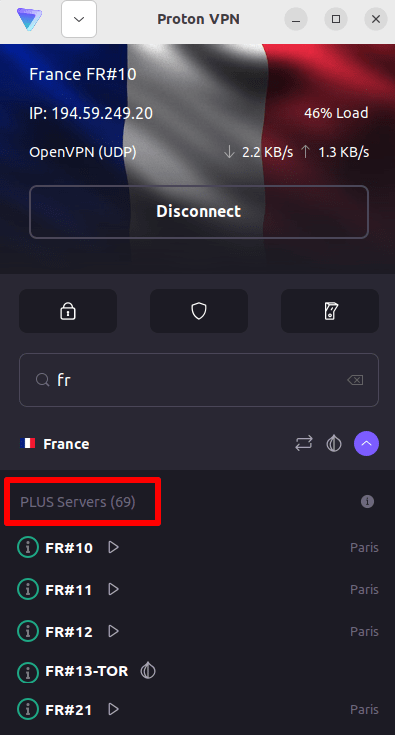
4. M6+のウェブサイト(https://www.m6.fr/)にアクセスし、アカウントを新規作成(サインアップ)します。プレミアムコンテンツをストリーミング視聴したい方向けに有料オプションも用意されていますが、M6+のコンテンツをストリーミング視聴するために有料サブスクリプションを登録する必要はありません。
5. M6+アカウントにサインインし、お気に入りのライブ放送や見逃し配信を選択して、Proton VPNで安全にストリーミング視聴を開始しましょう!
iOSおよびAndroidでProton VPNを使用してM6+を視聴する方法
1. まだ行っていない場合は、お使いのデバイスにProton VPNをダウンロードしてインストールする必要があります。
2. Proton VPN経由でストリーミングサービスをご利用になるには、有料のProton VPNプランが必要です。すでに Free プランをご利用の場合は、 アカウントをアップグレードするためにサインインし、アカウントのサブスクリプションページからご希望のプランを選択してください。
Proton VPNアカウントをお持ちでない場合は、こちらからPlusまたはUnlimitedプランにサインアップ(新しいウィンドウ)できます。
3. Proton VPNにログインし、フランスにある任意のサーバーに接続します。

4. M6+アプリをダウンロードし、アカウントを作成します。M6+でストリーミング視聴を開始するために有料サブスクリプションは必要ありません。ただし、プレミアムコンテンツにアクセスしたい方向けの有料サブスクリプションも提供されています。
注意:M6+ iOSアプリ(新しいウィンドウ)およびM6+ Androidアプリ(新しいウィンドウ)は、すべての国で利用できるわけではありません。
5. M6+アカウントにサインインし、フランスのテレビのライブ放送やお気に入りのフランスの番組の見逃し配信を安全にストリーミング視聴し始めましょう!
Android TVでProton VPNを使用してM6+を視聴する方法
1. Android TVでProton VPNを使用してM6+を視聴するには、まずAndroid TV用Proton VPNアプリをダウンロード(新しいウィンドウ)する必要があります。Android TVのセットアップ手順や適切なサーバーへの接続方法については、弊社のAndroid TVサポートガイドをご覧ください。
2. Android TVデバイスを使用して、フランスにあるサーバーに接続します。
Plusサーバーに接続するには、有料のProton VPNプランが必要です。すでに Free プランをご利用の場合は、 アカウントをアップグレードするためにサインインし、アカウントのサブスクリプションページからご希望のプランを選択してください。
Proton VPNアカウントをお持ちでない場合は、こちらからPlusまたはUnlimitedプランにサインアップ(新しいウィンドウ)できます。
3. お使いのAndroid TVデバイスにM6+アプリ(新しいウィンドウ)をインストールし、アカウントをお持ちでない場合は作成します。M6+でストリーミング視聴を開始するために有料サブスクリプションは必要ありません。ただし、プレミアムコンテンツにアクセスしたい方向けの有料サブスクリプションも提供されています。
4. M6+アプリを開き、アカウントにログインします。これで、お気に入りのフランスのテレビ番組をすべてProton VPNで安全に視聴し始めることができます!
M6+のストリーミングに関する問題のトラブルシューティング
上記の手順を実行してもM6+が機能しない場合は、以下のトラブルシューティングオプションをお試しください。
- Proton VPNアプリを再起動し、新しいVPN接続を開始します。
- ブラウザ経由でM6+にアクセスしている場合は、ブラウザのキャッシュをクリア(新しいウィンドウ)してみてください。
- デバイスを再起動します。
- DNSキャッシュをクリアします(Windows、Mac、またはLinux)。
これらの方法で解決しない場合は、弊社のストリーミングトラブルシューティングガイドをご覧いただくか、サポートチームまでお問い合わせ(新しいウィンドウ)ください。