


วิธีเลิกบล็อก M6+ ด้วย Proton VPN
- เวลาอ่าน
- 1 นาที
- หมวดหมู่
- คู่มือการสตรีม
M6+ (เดิมคือ 6play) เป็นบริการการสตรีมทีวีย้อนหลังของฝรั่งเศสที่สร้างโดยกลุ่มสื่อในฝรั่งเศสที่เรียกว่า M6 Group บริการการสตรีมนี้มีเนื้อหาจากช่องทีวีเจ็ดช่องให้เลือกสตรีม ได้แก่ M6, W9, 6ter, Gulli, Paris Première, Téva และ Le Live โดย M6+
บทความนี้จะอธิบายถึงวิธีใช้ Proton VPN เพื่อรับชม M6+:

สามารถใช้ Proton VPN เพื่อปลดล็อกบริการการสตรีมยอดนิยมอื่นๆ จากทั่วฝรั่งเศสได้เช่นกัน ซึ่งรวมถึง Canal+, France.tv และ Netflix รุ่นฝรั่งเศส, Disney+ และ Amazon Prime Video
คู่มือการสตรีม แสดงรายชื่อบริการการสตรีมทั้งหมดที่รองรับ
วิธีรับชม M6+ ด้วย Proton VPN จากเบราว์เซอร์
1. หากยังไม่ได้ดำเนินการ จะต้องดาวน์โหลดและติดตั้ง Proton VPN สำหรับอุปกรณ์
- Proton VPN สำหรับ Windows(หน้าต่างใหม่)
- Proton VPN สำหรับ macOS(หน้าต่างใหม่)
- Proton VPN สำหรับ Linux(หน้าต่างใหม่)
2. ในการใช้บริการการสตรีมผ่าน Proton VPN จำเป็นต้องใช้แผนบริการ Proton VPN แบบชำระเงิน หากมีแผนบริการ ฟรี อยู่แล้ว อัปเกรดบัญชีโดยการเข้าสู่ระบบและเลือกแผนบริการที่ต้องการจากหน้า การสมัครสมาชิก ของบัญชี
หากไม่มีบัญชี Proton VPN สามารถลงทะเบียนแผนบริการ Plus หรือ Unlimited ได้ที่นี่(หน้าต่างใหม่)
3. เข้าสู่ระบบ Proton VPN และเชื่อมต่อกับเซิร์ฟเวอร์ใดก็ได้ที่ตั้งอยู่ใน ฝรั่งเศส
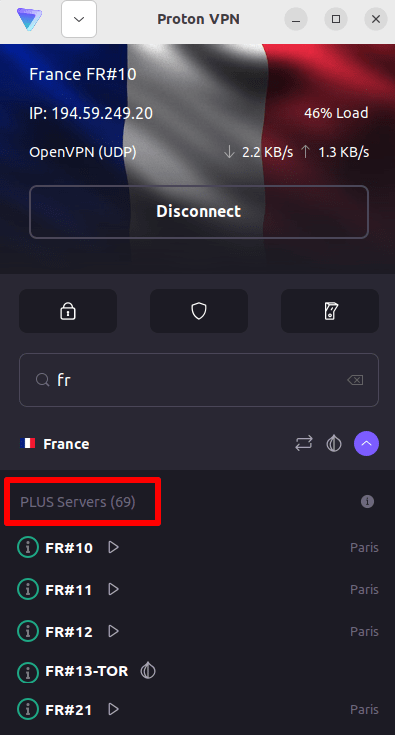
4. ไปที่เว็บไซต์ M6+ ที่ https://www.m6.fr/ และลงทะเบียนบัญชี ไม่จำเป็นต้องสมัครสมาชิกแบบชำระเงินเพื่อสตรีมเนื้อหาจาก M6+ แม้ว่าจะมีตัวเลือกแบบชำระเงินสำหรับผู้ที่ต้องการสตรีมเนื้อหาระดับพรีเมียมก็ตาม
5. เข้าสู่ระบบบัญชี M6+ และเลือกทีวีสดหรือทีวีย้อนหลังรายการโปรดเพื่อเริ่มสตรีมอย่างปลอดภัยด้วย Proton VPN!
วิธีรับชม M6+ ด้วย Proton VPN บน iOS และ Android
1. หากยังไม่ได้ดำเนินการ จะต้องดาวน์โหลดและติดตั้ง Proton VPN สำหรับอุปกรณ์
2. ในการใช้บริการการสตรีมผ่าน Proton VPN จำเป็นต้องใช้แผนบริการ Proton VPN แบบชำระเงิน หากมีแผนบริการ ฟรี อยู่แล้ว อัปเกรดบัญชีโดยการเข้าสู่ระบบและเลือกแผนบริการที่ต้องการจากหน้า การสมัครสมาชิก ของบัญชี
หากไม่มีบัญชี Proton VPN สามารถลงทะเบียนแผนบริการ Plus หรือ Unlimited ได้ที่นี่(หน้าต่างใหม่)
3. เข้าสู่ระบบ Proton VPN และเชื่อมต่อกับเซิร์ฟเวอร์ใดก็ได้ที่ตั้งอยู่ใน ฝรั่งเศส

4. ดาวน์โหลดแอป M6+ และสร้างบัญชีใหม่ ไม่จำเป็นต้องสมัครสมาชิกแบบชำระเงินเพื่อเริ่มสตรีมด้วย M6+ อย่างไรก็ตาม มีการสมัครสมาชิกแบบชำระเงินสำหรับผู้ที่ต้องการเข้าถึงเนื้อหาระดับพรีเมียม
หมายเหตุ: แอป M6+ สำหรับ iOS(หน้าต่างใหม่) และแอป M6+ สำหรับ Android(หน้าต่างใหม่) ไม่มีให้บริการในทุกประเทศ
5. เข้าสู่ระบบบัญชี M6+ และเริ่มสตรีมทีวีสดของฝรั่งเศสหรือรับชมรายการฝรั่งเศสรายการโปรดย้อนหลังอย่างปลอดภัย!
วิธีรับชม M6+ ด้วย Proton VPN บน Android TV
1. หากต้องการรับชม M6+ โดยใช้ Proton VPN บน Android TV ก่อนอื่นจำเป็นต้องดาวน์โหลดแอป Proton VPN สำหรับ Android TV(หน้าต่างใหม่) สำหรับคำแนะนำในการตั้งค่า Android TV และการเชื่อมต่อกับเซิร์ฟเวอร์ที่ถูกต้อง โปรดดูที่คู่มือการสนับสนุน Android TV
2. เชื่อมต่อกับเซิร์ฟเวอร์ที่ตั้งอยู่ใน ฝรั่งเศส โดยใช้อุปกรณ์ Android TV
ในการเชื่อมต่อกับเซิร์ฟเวอร์ Plus จำเป็นต้องใช้แผนบริการ Proton VPN แบบชำระเงิน หากมีแผนบริการ ฟรี อยู่แล้ว อัปเกรดบัญชีโดยการเข้าสู่ระบบและเลือกแผนบริการที่ต้องการจากหน้า การสมัครสมาชิก ของบัญชี
หากไม่มีบัญชี Proton VPN สามารถลงทะเบียนแผนบริการ Plus หรือ Unlimited ได้ที่นี่(หน้าต่างใหม่)
3. ติดตั้งแอป M6+(หน้าต่างใหม่) บนอุปกรณ์ Android TV และสร้างบัญชีใหม่หากยังไม่มี ไม่จำเป็นต้องสมัครสมาชิกแบบชำระเงินเพื่อเริ่มสตรีมด้วย M6+ อย่างไรก็ตาม มีการสมัครสมาชิกแบบชำระเงินสำหรับผู้ที่ต้องการเข้าถึงเนื้อหาระดับพรีเมียม
4. เปิดแอป M6+ และเข้าสู่ระบบบัญชี ตอนนี้สามารถเริ่มรับชมรายการทีวีฝรั่งเศสรายการโปรดทั้งหมดได้อย่างปลอดภัยด้วย Proton VPN!
การแก้ไขปัญหาการสตรีม M6+
หาก M6+ ไม่ทำงานหลังจากทำตามขั้นตอนข้างต้น ให้ลองใช้ตัวเลือกการแก้ไขปัญหาต่อไปนี้
- เริ่มแอป Proton VPN ใหม่และเริ่มการเชื่อมต่อ VPN ใหม่
- หากเข้าถึง M6+ ผ่านเบราว์เซอร์ ให้ลองล้างแคชของเบราว์เซอร์(หน้าต่างใหม่)
- เริ่มอุปกรณ์ใหม่
- ล้างแคช DNS (Windows, Mac หรือ Linux)
หากไม่มีตัวเลือกใดใช้ได้ผล โปรดดูคู่มือการแก้ไขปัญหาการสตรีม หรือติดต่อทีมงานฝ่ายสนับสนุน(หน้าต่างใหม่)