


Come sbloccare M6+ con Proton VPN
- Lettura
- 4 minuti
- Categoria
- Guide allo streaming
M6+ (in precedenza 6play) è un servizio di streaming di catch-up TV francese creato da un gruppo multimediale in Francia chiamato Gruppo M6. Questo servizio di streaming dispone di contenuti provenienti da sette canali televisivi da trasmettere in streaming: M6, W9, 6ter, Gulli, Paris Première, Téva e Le Live by M6+.
Questo articolo ti spiegherà come puoi utilizzare Proton VPN per guardare M6+:

Puoi usare Proton VPN anche per sbloccare altri popolari servizi di streaming in tutta la Francia, tra cui Canal+, France.tv e la versione francese di Netflix, Disney+ e Amazon Prime Video.
La nostra guida allo streaming elenca tutti i servizi di streaming che supportiamo.
Come guardare M6+ con Proton VPN dal tuo browser
1. Se non l’hai già fatto, devi scaricare e installare Proton VPN sul tuo dispositivo.
- Proton VPN per Windows(nuova finestra)
- Proton VPN per macOS(nuova finestra)
- Proton VPN per Linux(nuova finestra)
2. Per utilizzare i servizi di streaming tramite Proton VPN, avrai bisogno di un piano Proton VPN a pagamento. Se hai già un piano Gratuito, effettua l’upgrade del tuo account accedendo e selezionando il piano desiderato nella pagina Abbonamento del tuo account.
Se non hai un account Proton VPN, puoi registrarti a un piano Plus o Unlimited qui(nuova finestra).
3. Accedi a Proton VPN e connettiti a un qualsiasi server situato in Francia.
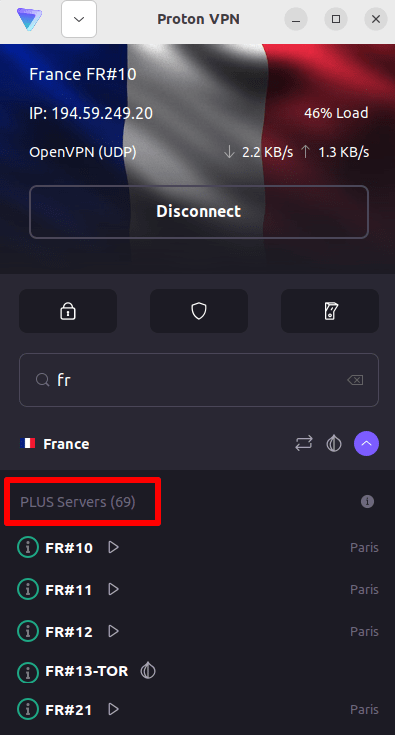
4. Visita il sito web di M6+ all’indirizzo https://www.m6.fr/ e registrati per creare un account. Non hai bisogno di un abbonamento a pagamento per trasmettere contenuti in streaming da M6+, anche se sono disponibili opzioni a pagamento per chi desidera guardare contenuti premium in streaming.
5. Accedi al tuo account M6+ e scegli la tua TV in diretta o catch-up preferita per iniziare lo streaming in tutta sicurezza con Proton VPN!
Come guardare M6+ con Proton VPN su iOS e Android
1. Se non l’hai già fatto, devi scaricare e installare Proton VPN sul tuo dispositivo.
2. Per utilizzare i servizi di streaming tramite Proton VPN, hai bisogno di un piano Proton VPN a pagamento. Se hai già un piano Gratuito, effettua l’upgrade del tuo account accedendo e selezionando il piano desiderato nella pagina Abbonamento del tuo account.
Se non hai un account Proton VPN, puoi registrarti a un piano Plus o Unlimited qui(nuova finestra).
3. Accedi a Proton VPN e connettiti a un qualsiasi server situato in Francia.

4. Scarica l’app M6+ e registrati per creare un account. Non hai bisogno di un abbonamento a pagamento per iniziare lo streaming con M6+. Tuttavia, sono disponibili abbonamenti a pagamento per chi desidera accedere ai contenuti premium.
Note: l’app iOS di M6+(nuova finestra) e l’app Android di M6+(nuova finestra) non sono disponibili in tutti i paesi.
5. Accedi al tuo account M6+ e inizia lo streaming della TV francese in diretta o del catch-up con i tuoi programmi francesi preferiti in tutta sicurezza!
Come guardare M6+ con Proton VPN su Android TV
1. Per guardare M6+ utilizzando Proton VPN sulla tua Android TV, devi prima scaricare l’app Proton VPN per Android TV(nuova finestra). Per istruzioni su come configurare Android TV e connetterti al server corretto, dai un’occhiata alla nostra guida al supporto per Android TV.
2. Connettiti a un server situato in Francia usando il tuo dispositivo Android TV.
Per connetterti ai nostri server Plus, hai bisogno di un piano Proton VPN a pagamento. Se hai già un piano Gratuito, effettua l’upgrade del tuo account accedendo e selezionando il piano desiderato nella pagina Abbonamento del tuo account.
Se non hai un account Proton VPN, puoi registrarti a un piano Plus o Unlimited qui(nuova finestra).
3. Installa l’app M6+(nuova finestra) sul tuo dispositivo Android TV e crea un account se non ne hai già uno. Non hai bisogno di un abbonamento a pagamento per iniziare lo streaming con M6+. Tuttavia, sono disponibili abbonamenti a pagamento per chi desidera accedere ai contenuti premium.
4. Apri l’app M6+ e accedi al tuo account. Ora puoi iniziare a guardare tutti i tuoi programmi TV francesi preferiti in tutta sicurezza con Proton VPN!
Risoluzione dei problemi di streaming con M6+
Se M6+ non funziona dopo aver seguito i passaggi precedenti, prova le seguenti opzioni di risoluzione dei problemi.
- Riavvia l’app Proton VPN e avvia una nuova connessione VPN.
- Se accedi a M6+ tramite il tuo browser, prova a svuotare la cache del browser(nuova finestra).
- Riavvia il tuo dispositivo.
- Svuota la cache DNS (Windows, Mac o Linux).
Se nessuna di queste opzioni funziona, dai un’occhiata alla nostra guida alla risoluzione dei problemi di streaming o contatta il nostro team di supporto(nuova finestra).