


How to unblock M6+ with Proton VPN
- 阅读
- 2 分钟
- 类别
- 直播中指南
M6+ (was 6play) is a French catch-up television streaming service created by a media group in France called the M6 Group. This streaming service has content from seven TV channels to stream: M6, W9, 6ter, Gulli, Paris Première, Téva, and Le Live by M6+.
This article will explain how you can use Proton VPN to watch M6+:

您还可以使用 Proton VPN 解除法国其他热门流媒体服务的访问限制,包括 Canal+、France.tv,以及法国版的 Netflix、Disney+ 和 Amazon Prime Video。
我们的直播指南列出了我们支持的全部流媒体服务。
How to watch M6+ with Proton VPN from your browser
1. 如果您还没有在设备上下载并安装 Proton VPN,请先完成下载和安装。
2. 要通过 Proton VPN 使用流媒体服务,您需要付费的 Proton VPN 套餐。如果您使用的是 Free 套餐,请升级您的帐户:登入后,在帐户的 订阅 页面选择所需的套餐即可。
如果您还没有 Proton VPN 帐户,可以在此注册 Plus 或 Unlimited 套餐(新窗口)。
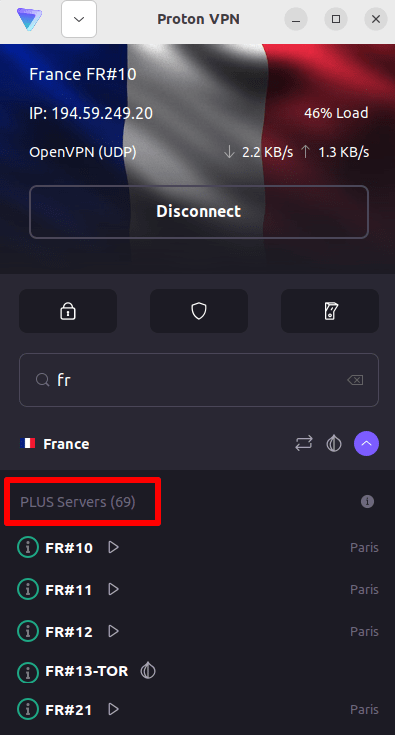
3. 登录 Proton VPN,并连接到位于法国的任意服务器。
4. Visit the M6+ website at https://www.m6.fr/ and sign up for an account. You do not need a paid subscription to stream content from M6+, although there are paid options available for those who want to stream premium content.
5. Sign in to your M6+ account and choose your favorite live or catch-up television to start streaming securely with Proton VPN!
How to watch M6+ with Proton VPN on iOS and Android
1. 如果您还没有在设备上下载并安装 Proton VPN,请先完成下载和安装。
2. 要通过 Proton VPN 使用流媒体服务,您需要付费的 Proton VPN 套餐。如果您使用的是 Free 套餐,请升级您的帐户:登入后,在帐户的 订阅 页面选择所需的套餐即可。
如果您还没有 Proton VPN 帐户,可以在此注册 Plus 或 Unlimited 套餐(新窗口)。
3. 登录 Proton VPN,并连接到位于法国的任意服务器。

4. Download the M6+ app and create an account. You do not need a paid subscription to start streaming with M6+. However, there are paid subscriptions for those who want to access premium content.
Note: The M6+ iOS app(新窗口) and the M6+ Android app(新窗口) are not available in all countries.
5. Sign in to your M6+ account, and start streaming live French TV or catch-up with your favorite French shows securely!
How to watch M6+ with Proton VPN on Android TV
1. To watch M6+ using Proton VPN on your Android TV, you first need to download the Android TV Proton VPN app(新窗口). For instructions on setting up Android TV and connecting to the right server, take a look at our Android TV support guide.
2. 使用您的 Android TV 设备连接到位于法国的服务器。
要连接到我们的 Plus 服务器,您需要付费的 Proton VPN 套餐。如果您使用的是 Free 套餐,请升级您的帐户:登入后,在帐户的 订阅 页面选择所需的套餐即可。
如果您还没有 Proton VPN 帐户,可以在此注册 Plus 或 Unlimited 套餐(新窗口)。
3. Install the M6+ app(新窗口) on your Android TV device and create an account if you don’t already have one. You do not need a paid subscription to start streaming with M6+. However, there are paid subscriptions available for those who want to access premium content.
4. Open the M6+ app and log in to your account. You can now start watching all your favorite French TV shows securely with Proton VPN!
Troubleshooting M6+ streaming problems
If M6+ does not work after following the above steps, try the following troubleshooting options.
- 重启 Proton VPN 应用并建立新的 VPN 连接。
- If you are accessing M6+ via your browser, try clearing your browser cache(新窗口).
- 重启您的设备。
- 清除您的 DNS 缓存(Windows、Mac 或 Linux)。
如果以上方法均无效,请查看我们的 直播故障排除指南,或联系我们的支持团队(新窗口)。