


Comment débloquer M6+ avec Proton VPN
- Lecture
- 4 minutes
- Catégorie
- Guides de streaming
M6+ (anciennement 6play) est un service français de streaming de télévision de rattrapage créé par un groupe de médias en France appelé le Groupe M6. Ce service de streaming propose du contenu provenant de sept canaux de télévision à regarder : M6, W9, 6ter, Gulli, Paris Première, Téva et Le Live by M6+.
Cet article vous expliquera comment utiliser Proton VPN pour regarder M6+ :
- Sur les appareils Windows, macOS et Linux
- Sur les appareils Android et iOS
- Sur votre Smart TV Android TV

Vous pouvez également utiliser Proton VPN pour débloquer d’autres services de streaming populaires dans toute la France, notamment Canal+, France.tv ainsi que la version française de Netflix, Disney+ et Amazon Prime Video.
Notre guide de streaming répertorie tous les services de streaming que nous prenons en charge.
Comment regarder M6+ avec Proton VPN depuis votre navigateur
1. Si ce n’est pas déjà fait, vous devez télécharger et installer Proton VPN sur votre appareil.
- Proton VPN pour Windows(nouvelle fenêtre)
- Proton VPN pour macOS(nouvelle fenêtre)
- Proton VPN pour Linux(nouvelle fenêtre)
2. Pour utiliser les services de streaming via Proton VPN, vous aurez besoin d’un abonnement Proton VPN payant. Si vous possédez déjà un abonnement Free, changez d’abonnement en vous connectant et en sélectionnant l’abonnement souhaité depuis la page Abonnement de votre compte.
Si vous n’avez pas de compte Proton VPN, vous pouvez vous inscrire à un abonnement Plus ou Unlimited ici(nouvelle fenêtre).
3. Connectez-vous à Proton VPN et connectez-vous à un serveur situé en France.
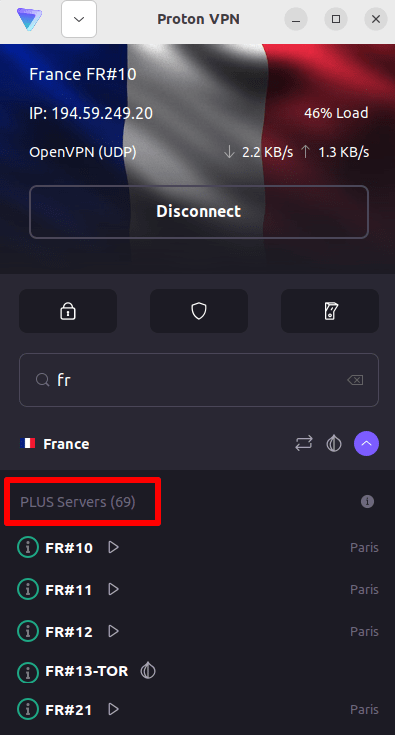
4. Visitez le site internet de M6+ à l’adresse https://www.m6.fr/ et inscrivez-vous pour créer un compte. Vous n’avez pas besoin d’un abonnement payant pour regarder du contenu sur M6+, bien que des options payantes soient disponibles pour les personnes souhaitant regarder du contenu premium.
5. Connectez-vous à votre compte M6+ et choisissez votre télévision en direct ou de rattrapage favorite pour commencer à regarder vos contenus en toute sécurité avec Proton VPN !
Comment regarder M6+ avec Proton VPN sur iOS et Android
1. Si ce n’est pas déjà fait, vous devez télécharger et installer Proton VPN sur votre appareil.
2. Pour utiliser les services de streaming via Proton VPN, vous avez besoin d’un abonnement Proton VPN payant. Si vous possédez déjà un abonnement Free, changez d’abonnement en vous connectant et en sélectionnant l’abonnement souhaité depuis la page Abonnement de votre compte.
Si vous n’avez pas de compte Proton VPN, vous pouvez vous inscrire à un abonnement Plus ou Unlimited ici(nouvelle fenêtre).
3. Connectez-vous à Proton VPN et connectez-vous à un serveur situé en France.

4. Téléchargez l’application M6+ et créez un compte. Vous n’avez pas besoin d’un abonnement payant pour commencer à regarder M6+. Cependant, des abonnements payants sont disponibles pour les personnes qui souhaitent accéder à du contenu premium.
Remarque : l’ application iOS M6+(nouvelle fenêtre) et l’ application Android M6+(nouvelle fenêtre) ne sont pas disponibles dans tous les pays.
5. Connectez-vous à votre compte M6+ et commencez à regarder la télévision française en direct ou en rattrapage pour retrouver vos émissions françaises favorites en toute sécurité !
Comment regarder M6+ avec Proton VPN sur Android TV
1. Pour regarder M6+ avec Proton VPN sur votre Android TV, vous devez d’abord télécharger l’application Proton VPN pour Android TV(nouvelle fenêtre). Pour obtenir des instructions sur la configuration d’Android TV et la connexion au bon serveur, consultez notre guide de support Android TV.
2. Connectez-vous à un serveur situé en France à l’aide de votre appareil Android TV.
Pour vous connecter à nos serveurs Plus, vous avez besoin d’un abonnement Proton VPN payant. Si vous possédez déjà un abonnement Free, changez d’abonnement en vous connectant et en sélectionnant l’abonnement souhaité depuis la page Abonnement de votre compte.
Si vous n’avez pas de compte Proton VPN, vous pouvez vous inscrire à un abonnement Plus ou Unlimited ici(nouvelle fenêtre).
3. Installez l’application M6+(nouvelle fenêtre) sur votre appareil Android TV et créez un compte si vous n’en avez pas déjà un. Vous n’avez pas besoin d’un abonnement payant pour commencer à regarder M6+. Cependant, des abonnements payants sont disponibles pour les personnes qui souhaitent accéder à du contenu premium.
4. Ouvrez l’application M6+ et connectez-vous à votre compte. Vous pouvez maintenant commencer à regarder toutes vos émissions de télévision françaises favorites en toute sécurité avec Proton VPN !
Dépannage des problèmes de streaming de M6+
Si M6+ ne fonctionne pas après avoir suivi les étapes ci-dessus, essayez les options de dépannage suivantes.
- Redémarrez l’application Proton VPN et établissez une nouvelle connexion VPN.
- Si vous accédez à M6+ via votre navigateur, essayez d’effacer le cache de votre navigateur(nouvelle fenêtre).
- Redémarrez votre appareil.
- Videz votre cache DNS (Windows, Mac ou Linux).
Si aucune de ces options ne fonctionne, veuillez consulter notre guide de dépannage pour le streaming ou contacter notre équipe de support(nouvelle fenêtre).