


Jak odblokować M6+ za pomocą Proton VPN
- Odczytywanie
- 4 min
- Kategoria
- Poradniki dotyczące streamingu
M6+ (dawniej 6play) to francuska usługa streamingu telewizyjnego typu catch-up utworzona przez francuską grupę medialną o nazwie M6 Group. Ta usługa streamingowa oferuje treści z siedmiu kanałów telewizyjnych do streamowania: M6, W9, 6ter, Gulli, Paris Première, Téva oraz Le Live by M6+.
Ten artykuł wyjaśnia, jak możesz używać Proton VPN do oglądania M6+:
- Na urządzeniach z systemami Windows, macOS i Linux
- Na urządzeniach z systemami Android i iOS
- Na swoim telewizorze smart TV z systemem Android TV

Możesz również użyć Proton VPN do odblokowania innych popularnych usług streamingowych z całej Francji, w tym Canal+, France.tv oraz francuskiej wersji serwisów Netflix, Disney+ i Amazon Prime Video.
Nasz przewodnik po streamingu zawiera listę wszystkich obsługiwanych przez nas platform streamingowych.
Jak oglądać M6+ za pomocą Proton VPN z poziomu przeglądarki
1. Jeśli jeszcze tego nie zrobiłeś, musisz pobrać i zainstalować Proton VPN na swoim urządzeniu.
- Proton VPN na system Windows(nowe okno)
- Proton VPN na system macOS(nowe okno)
- Proton VPN na system Linux(nowe okno)
2. Aby korzystać z usług streamingowych za pośrednictwem Proton VPN, będziesz potrzebować płatnego planu Proton VPN. Jeśli masz już plan Free, ulepsz swoje konto, logując się i wybierając odpowiedni plan na stronie Subskrypcja na swoim koncie.
Jeśli nie masz konta Proton VPN, możesz zarejestrować się tutaj, aby wybrać plan Plus lub Unlimited(nowe okno).
3. Zaloguj się do Proton VPN i połącz się z dowolnym serwerem zlokalizowanym we Francji.
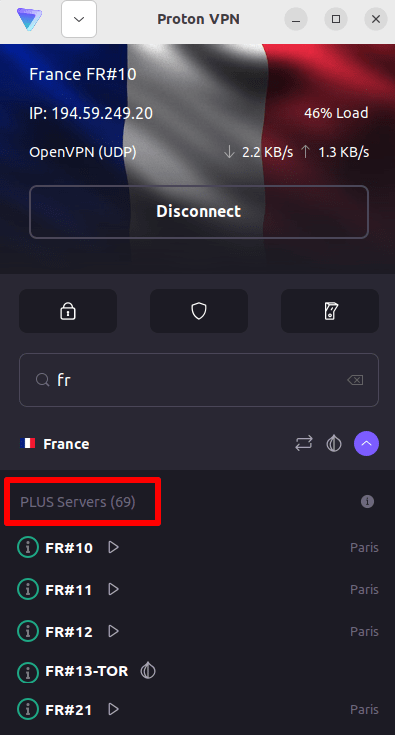
4. Wejdź na stronę internetową M6+ pod adresem https://www.m6.fr/ i zarejestruj się, aby utworzyć konto. Nie potrzebujesz płatnej subskrypcji, aby streamować treści z M6+, choć dostępne są płatne opcje dla osób, które chcą streamować treści premium.
5. Zaloguj się na swoje konto M6+ i wybierz swoją ulubioną telewizję na żywo lub typu catch-up, aby rozpocząć bezpieczne streamowanie z Proton VPN!
Jak oglądać M6+ za pomocą Proton VPN na systemach iOS i Android
1. Jeśli jeszcze tego nie zrobiłeś, musisz pobrać i zainstalować Proton VPN na swoim urządzeniu.
2. Aby korzystać z usług streamingowych za pośrednictwem Proton VPN, potrzebujesz płatnego planu Proton VPN. Jeśli masz już plan Free, ulepsz swoje konto, logując się i wybierając odpowiedni plan na stronie Subskrypcja na swoim koncie.
Jeśli nie masz konta Proton VPN, możesz zarejestrować się tutaj, aby wybrać plan Plus lub Unlimited(nowe okno).
3. Zaloguj się do Proton VPN i połącz się z dowolnym serwerem zlokalizowanym we Francji.

4. Pobierz aplikację M6+ i utwórz konto. Nie potrzebujesz płatnej subskrypcji, aby rozpocząć streamowanie w M6+. Dostępne są jednak płatne subskrypcje dla osób, które chcą uzyskać dostęp do treści premium.
Uwaga: Aplikacja M6+ na system iOS(nowe okno) oraz aplikacja M6+ na system Android(nowe okno) nie są dostępne we wszystkich krajach.
5. Zaloguj się na swoje konto M6+ i zacznij bezpiecznie streamować francuską telewizję na żywo lub nadrabiać ulubione francuskie programy!
Jak oglądać M6+ za pomocą Proton VPN na Android TV
1. Aby oglądać M6+ przy użyciu Proton VPN na swoim Android TV, musisz najpierw pobrać aplikację Proton VPN na Android TV(nowe okno). Instrukcje dotyczące konfiguracji Android TV i łączenia się z odpowiednim serwerem znajdziesz w naszym przewodniku wsparcia dla Android TV.
2. Połącz się z serwerem zlokalizowanym we Francji, używając swojego urządzenia z systemem Android TV.
Aby łączyć się z naszymi serwerami Plus, potrzebujesz płatnego planu Proton VPN. Jeśli masz już plan Free, ulepsz swoje konto, logując się i wybierając odpowiedni plan na stronie Subskrypcja na swoim koncie.
Jeśli nie masz konta Proton VPN, możesz zarejestrować się tutaj, aby wybrać plan Plus lub Unlimited(nowe okno).
3. Zainstaluj aplikację M6+(nowe okno) na swoim urządzeniu Android TV i utwórz konto, jeśli jeszcze go nie masz. Nie potrzebujesz płatnej subskrypcji, aby rozpocząć streamowanie w M6+. Dostępne są jednak płatne subskrypcje dla osób, które chcą uzyskać dostęp do treści premium.
4. Otwórz aplikację M6+ i zaloguj się na swoje konto. Możesz teraz bezpiecznie oglądać wszystkie swoje ulubione francuskie programy telewizyjne dzięki Proton VPN!
Rozwiązywanie problemów ze streamingiem M6+
Jeśli po wykonaniu powyższych kroków usługa M6+ nie działa, wypróbuj następujące sposoby rozwiązywania problemów.
- Uruchom ponownie aplikację Proton VPN i nawiąż nowe połączenie VPN.
- Jeśli uzyskujesz dostęp do M6+ z poziomu przeglądarki, spróbuj wyczyścić pamięć podręczną przeglądarki(nowe okno).
- Uruchom ponownie swoje urządzenie.
- Wyczyść pamięć podręczną DNS (Windows, Mac lub Linux).
Jeśli żadna z tych opcji nie pomoże, zapoznaj się z naszym przewodnikiem rozwiązywania problemów ze streamingiem lub skontaktuj się z naszym zespołem pomocy technicznej(nowe okno).