


Hoe u M6+ deblokkeert met Proton VPN
- Lezen
- 4 min
- Categorie
- Streaminggidsen
M6+ (voorheen 6play) is een Franse streamingdienst voor uitgestelde televisie, gecreëerd door een Franse mediagroep genaamd de M6 Group. Deze streamingdienst biedt inhoud van zeven tv-kanalen om te streamen: M6, W9, 6ter, Gulli, Paris Première, Téva en Le Live van M6+.
Dit artikel legt uit hoe u Proton VPN kunt gebruiken om M6+ te kijken:

U kunt Proton VPN ook gebruiken om andere populaire streamingdiensten uit heel Frankrijk te deblokkeren, waaronder Canal+, France.tv en de Franse versie van Netflix, Disney+ en Amazon Prime Video.
In onze streaminggids vindt u alle streamingdiensten die we ondersteunen.
Hoe u M6+ kunt kijken met Proton VPN vanuit uw browser
1. Als u dat nog niet heeft gedaan, moet u Proton VPN downloaden en installeren voor uw apparaat.
- Proton VPN voor Windows(nieuw venster)
- Proton VPN voor macOS(nieuw venster)
- Proton VPN voor Linux(nieuw venster)
2. Om streamingdiensten te gebruiken via Proton VPN, heeft u een betaald Proton VPN-abonnement nodig. Als u al een Gratis abonnement heeft, kunt u uw account upgraden door in te loggen en het gewenste abonnement te selecteren op de pagina Abonnement van uw account.
Als u geen Proton VPN-account heeft, kunt u u hier inschrijven voor een Plus- of Unlimited-abonnement(nieuw venster).
3. Meld u aan bij Proton VPN en maak verbinding met een server in Frankrijk.
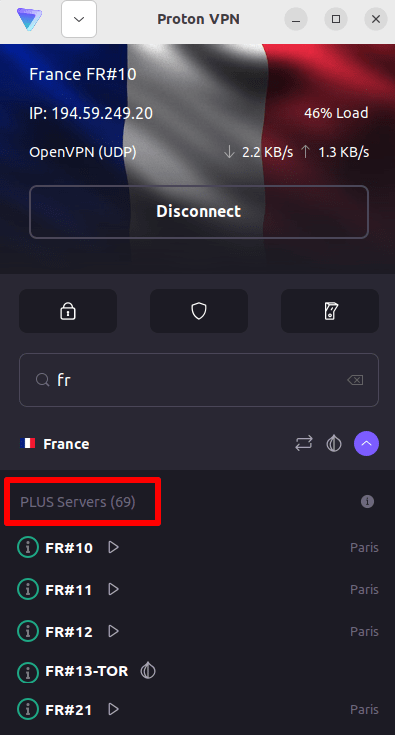
4. Bezoek de M6+-website op https://www.m6.fr/ en maak een account aan. U heeft geen betaald abonnement nodig om inhoud van M6+ te streamen, hoewel er betaalde opties beschikbaar zijn voor degenen die premium-inhoud willen streamen.
5. Log in op uw M6+-account en kies uw favoriete live of uitgestelde televisie om veilig te beginnen met streamen met Proton VPN!
Hoe u M6+ kunt kijken met Proton VPN op iOS en Android
1. Als u dat nog niet heeft gedaan, moet u Proton VPN downloaden en installeren voor uw apparaat.
2. Om streamingdiensten te gebruiken via Proton VPN, heeft u een betaald Proton VPN-abonnement nodig. Als u al een Gratis abonnement heeft, kunt u uw account upgraden door in te loggen en het gewenste abonnement te selecteren op de pagina Abonnement van uw account.
Als u geen Proton VPN-account heeft, kunt u u hier inschrijven voor een Plus- of Unlimited-abonnement(nieuw venster).
3. Meld u aan bij Proton VPN en maak verbinding met een server in Frankrijk.

4. Download de M6+-app en maak een account aan. U heeft geen betaald abonnement nodig om te beginnen met streamen op M6+. Er zijn echter betaalde abonnementen voor degenen die toegang willen tot premium-inhoud.
Note: De M6+ iOS-app(nieuw venster) en de M6+ Android-app(nieuw venster) zijn niet in alle landen beschikbaar.
5. Log in op uw M6+-account en begin veilig met het streamen van live Franse tv of kijk uw favoriete Franse programma’s terug!
Hoe u M6+ kunt kijken met Proton VPN op Android TV
1. Om M6+ te kijken met Proton VPN op uw Android TV, moet u eerst de Proton VPN-app voor Android TV downloaden(nieuw venster). Voor instructies over het instellen van Android TV en het verbinden met de juiste server, raadpleegt u onze Android TV-ondersteuningsgids.
2. Maak verbinding met een server in Frankrijk via uw Android TV-apparaat.
Om verbinding te maken met onze Plus-servers, heeft u een betaald Proton VPN-abonnement nodig. Als u al een Gratis abonnement heeft, kunt u uw account upgraden door in te loggen en het gewenste abonnement te selecteren op de pagina Abonnement van uw account.
Als u geen Proton VPN-account heeft, kunt u u hier inschrijven voor een Plus- of Unlimited-abonnement(nieuw venster).
3. Installeer de M6+-app(nieuw venster) op uw Android TV-apparaat en maak een account aan als u er nog geen heeft. U heeft geen betaald abonnement nodig om te beginnen met streamen op M6+. Er zijn echter betaalde abonnementen beschikbaar voor degenen die toegang willen tot premium-inhoud.
4. Open the M6+-app en log in op uw account. U kunt nu veilig beginnen met het kijken naar al uw favoriete Franse tv-programma’s met Proton VPN!
Probleemoplossing voor M6+-streamingproblemen
Als M6+ niet werkt na het volgen van de bovenstaande stappen, probeert u dan de volgende opties voor probleemoplossing.
- Herstart de Proton VPN-app en start een nieuwe VPN-verbinding.
- Als u M6+ via uw browser opent, probeert u dan het cachegeheugen van uw browser te wissen(nieuw venster).
- Herstart uw apparaat.
- Wis uw DNS-cache (Windows, Mac of Linux).
Als geen van deze opties werkt, raadpleeg dan onze gids voor probleemoplossing bij streamen of neem contact op met ons ondersteuningsteam(nieuw venster).