


How to unblock M6+ with Proton VPN
- Reading
- 4 mins
- Category
- Streaming guides
M6+ (was 6play) is a French catch-up television streaming service created by a media group in France called the M6 Group. This streaming service has content from seven TV channels to stream: M6, W9, 6ter, Gulli, Paris Première, Téva, and Le Live by M6+.
This article will explain how you can use Proton VPN to watch M6+:

You can use Proton VPN to unblock other popular streaming services from across France as well, including Canal+, France.tv, and the French version of Netflix, Disney+, and Amazon Prime Video.
Our streaming guide lists all the streaming services we support.
How to watch M6+ with Proton VPN from your browser
1. If you haven’t already, you need to download and install Proton VPN for your device.
- Proton VPN for Windows(new window)
- Proton VPN for macOS(new window)
- Proton VPN for Linux(new window)
2. To use streaming services via Proton VPN, you will need a paid Proton VPN plan. If you already have a Free plan, upgrade your account by signing in and selecting the desired plan from your account Subscription page.
If you do not have a Proton VPN account, you can sign up for a Plus or Unlimited plan here(new window).
3. Log in to Proton VPN and connect to any server located in France.
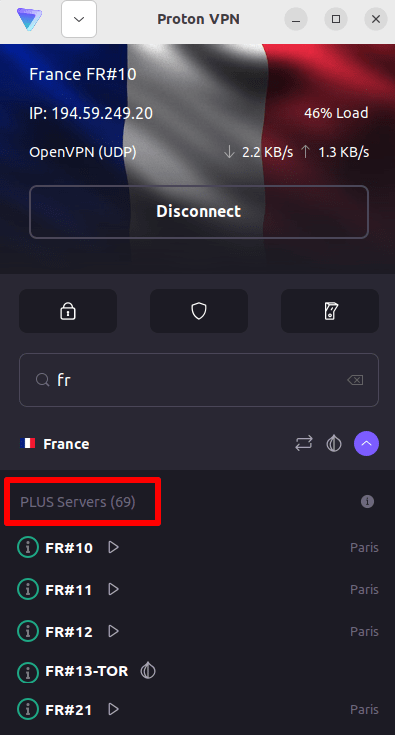
4. Visit the M6+ website at https://www.m6.fr/ and sign up for an account. You do not need a paid subscription to stream content from M6+, although there are paid options available for those who want to stream premium content.
5. Sign in to your M6+ account and choose your favorite live or catch-up television to start streaming securely with Proton VPN!
How to watch M6+ with Proton VPN on iOS and Android
1. If you haven’t already, you need to download and install Proton VPN for your device.
2. To use streaming services via Proton VPN, you need a paid Proton VPN plan. If you already have a Free plan, upgrade your account by signing in and selecting the desired plan from your account Subscription page.
If you do not have a Proton VPN account, you can sign up for a Plus or Unlimited plan here(new window).
3. Log in to Proton VPN and connect to any server located in France.

4. Download the M6+ app and create an account. You do not need a paid subscription to start streaming with M6+. However, there are paid subscriptions for those who want to access premium content.
Note: The M6+ iOS app(new window) and the M6+ Android app(new window) are not available in all countries.
5. Sign in to your M6+ account, and start streaming live French TV or catch-up with your favorite French shows securely!
How to watch M6+ with Proton VPN on Android TV
1. To watch M6+ using Proton VPN on your Android TV, you first need to download the Android TV Proton VPN app(new window). For instructions on setting up Android TV and connecting to the right server, take a look at our Android TV support guide.
2. Connect to a server located in France using your Android TV device.
To connect to our Plus servers, you need a paid Proton VPN plan. If you already have a Free plan, upgrade your account by signing in and selecting the desired plan from your account Subscription page.
If you do not have a Proton VPN account, you can sign up for a Plus or Unlimited plan here(new window).
3. Install the M6+ app(new window) on your Android TV device and create an account if you don’t already have one. You do not need a paid subscription to start streaming with M6+. However, there are paid subscriptions available for those who want to access premium content.
4. Open the M6+ app and log in to your account. You can now start watching all your favorite French TV shows securely with Proton VPN!
Troubleshooting M6+ streaming problems
If M6+ does not work after following the above steps, try the following troubleshooting options.
- Restart the Proton VPN app and start a new VPN connection.
- If you are accessing M6+ via your browser, try clearing your browser cache(new window).
- Restart your device.
- Clear your DNS cache (Windows, Mac, or Linux).
If none of these options work, please check out our Streaming troubleshooting guide or contact our Support team(new window).