วิธีใช้แชทสด Proton VPN
- เวลาอ่าน
- 0 นาที
- หมวดหมู่
- เริ่มต้นใช้งาน
ด้วยบริการแชทสดตลอด 24 ชั่วโมง ทั้ง 7 วันของเรา คุณสามารถติดต่อทีมฝ่ายสนับสนุนเพื่อสนทนาข้อความสดแบบตัวต่อตัวเกี่ยวกับความต้องการด้านการสนับสนุนของคุณ คุณสมบัตินี้มีให้สำหรับทุกคนที่ใช้แผนบริการ Proton VPN แบบชำระเงิน
แชทสด Proton VPN ใช้ ZenDesk ในการจัดการคำขอความช่วยเหลือ แต่การแชททั้งหมดจะดำเนินการโดยทีมฝ่ายสนับสนุนภายในที่เป็นผู้เชี่ยวชาญ
หากต้องการเริ่มเซสชันแชทสด ให้ดำเนินการอย่างใดอย่างหนึ่งดังนี้:
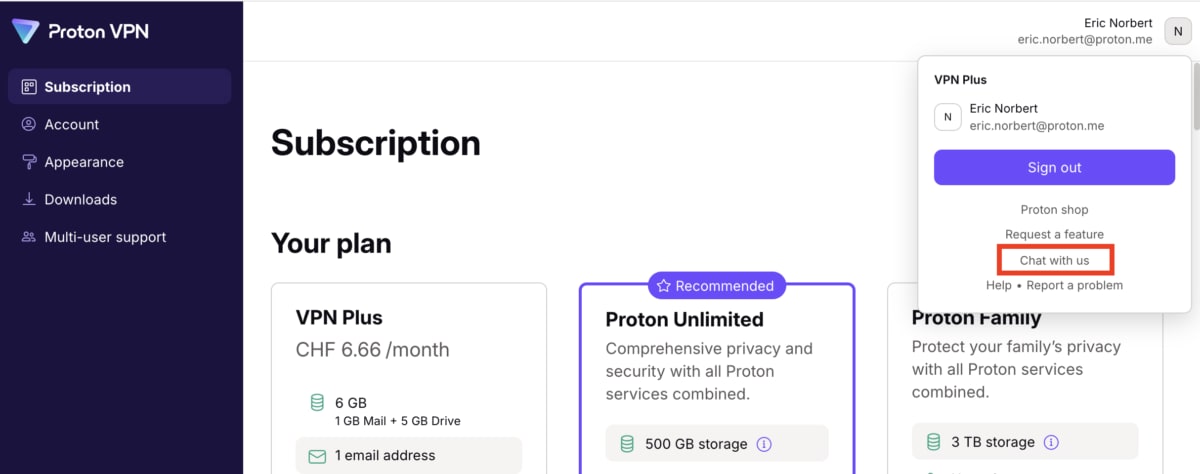
1. เข้าสู่ระบบบัญชี Proton VPN ที่ account.protonvpn.com แล้วคลิกที่ ชื่อบัญชี Proton → คุยกับเราผ่านแชท
หรือ:
2. ไปที่ protonvpn.com(หน้าต่างใหม่) เลื่อนลงไปที่ด้านล่างสุดของหน้า แล้วคลิก แชทสด โดยต้องเข้าสู่ระบบบัญชี Proton เพื่อดำเนินการต่อ

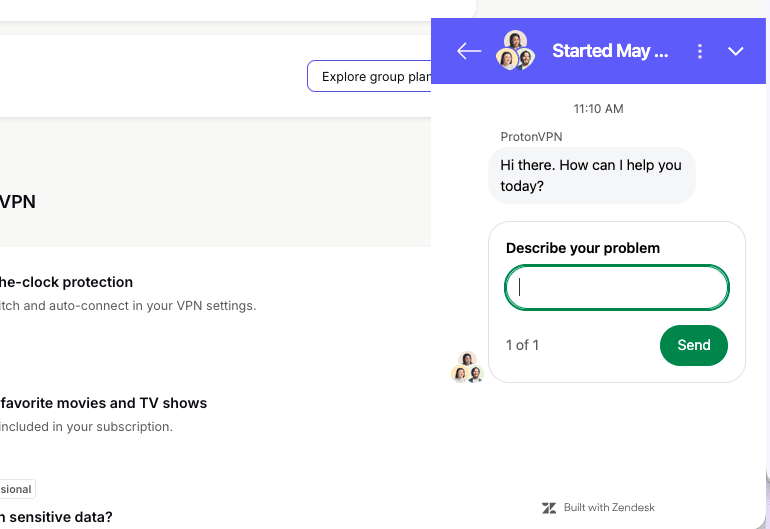
เมื่อหน้าต่างแชทสดปรากฏขึ้น ให้ระบุปัญหาที่พบแล้วคลิก ส่ง เพื่อเริ่มพูดคุยกับเจ้าหน้าที่ของทีมฝ่ายสนับสนุน