


Kuinka Proton VPN -GUI-sovellus asennetaan Fedoraan
- Luetaan
- 3 min
- Kategoria
- Linux
Tässä artikkelissa kerrotaan, kuinka Proton VPN -Linux-GUI-sovellusta käytetään Fedora-järjestelmässänne. GUI-sovelluksemme tukee virallisesti uusinta vakaata Fedora-versiota, jossa on käytössä GNOME-työpöytäympäristö. Tällä hetkellä se on Fedora 44.
Se saattaa toimia muissa Fedoran työpöytäympäristöissä (kuten KDE:ssä), mutta niiden tuki voi olla rajallinen.
Huomatkaa, että tarjoamme myös Proton VPN CLI -komentoravityökalun, joka toimii Linux-päätteessä.
Lue, miten Proton VPN Linux CLI asennetaan ja miten sitä käytetään
Asentaaksenne GUI-sovelluksen avatkaa pääteikkuna ja:
1. Ladatkaa paketti, joka sisältää Proton VPN -sovelluksen asentamiseen tarvittavat pakettivaraston määritykset ja avaimet. Syöttäkää:
wget "https://repo.protonvpn.com/fedora-$(cat /etc/fedora-release | cut -d' ' -f 3)-stable/protonvpn-stable-release/protonvpn-stable-release-1.0.4-1.noarch.rpm"
2. Asenna Proton VPN -ohjelmistolähde, joka sisältää sovelluksen. Suorita komento:
sudo dnf install ./protonvpn-stable-release-1.0.4-1.noarch.rpm && sudo dnf check-update --refresh
3. Asentakaa sovellus. Suorittakaa:
sudo dnf install proton-vpn-gnome-desktop
Osana asennusprosessia teitä pyydetään hyväksymään OpenPGP-avain. Hyväksykää se pyydettäessä painamalla y ja sen jälkeen .
- UserID : “Proton Technologies AG (Fedora 44) <opensource@proton.me>”
Sormenjälki: 6929133BDE1CE1CFA9EDB286D84176F6844830D4
Lähettäjä : https://repo.protonvpn.com/fedora-44-stable/public_key.asc(uusi ikkuna)
Huomautus: Tämä sormenjälki on oikea vain Fedoran uusimmalle versiolle (v. 44). Jos käytätte vanhempaa Fedoran versiota, sormenjälki on eri.
Ilmoitusalueen kuvake (valinnainen)
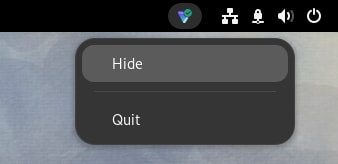
Oletusarvoisesti GNOME-työpöytä ei tue ilmoitusalueen kuvakkeita. Ottaaksenne tämän toiminnon käyttöön:
1. Suorittakaa:
sudo dnf install libappindicator-gtk3 gnome-shell-extension-appindicator gnome-extensions-app
2. Käynnistäkää tietokoneenne uudelleen.
3. Kun olette tehneet tämän, avatkaa Extensions-sovellus ja varmistakaa, että AppIndicator ja KStatusNotifierItem Support on kytketty päälle ennen sovelluksen avaamista.

Varoitus pip- ja PyPI-palveluiden käyttämisestä
Huomautukset
1. Virallisen Linux-sovelluksen poistaminen
Poistaaksenne Linux-sovelluksen asennuksen avatkaa pääte ja syöttäkää:
sudo dnf remove proton-vpn-gnome-desktop protonvpn-stable-release
2. Tappokytkimen poistaminen käytöstä sovelluksen asennuksen poistamisen jälkeen
Voitte helposti poistaa tappokytkimen käytöstä Linux-sovelluksestamme käsin, mutta tämä ei ole mahdollista, jos olette jo poistaneet sovelluksen asennuksen. Tässä tapauksessa voitte poistaa tappokytkimen ja palauttaa internetyhteyden seuraavasti:
a) Tunnistakaa Proton VPN -yhteyksien nimet suorittamalla komento:
nmcli connection show --active
Tämä näyttää luettelon järjestelmänne aktiivisista yhteyksistä.
b) Etsikää yhteyksiä, joiden nimessä on pvpn-. Näihin kuuluvat yleensä pvpn-killswitch ja pvpn-ipv6leak-protection, ja ne voivat sisältää myös kohteen pvpn-routed-killswitch. Poistakaa kaikki nämä yhteydet seuraavalla komennolla:
nmcli connection delete [yhteyden nimi]
Esimerkiksi:
nmcli connection delete pvpn-killswitch
c) Suorittakaa seuraava komento uudelleen varmistaaksenne, että kaikki Proton VPN -yhteydet on poistettu:
nmcli connection show --active
Jos näette jäljellä olevia Proton VPN -yhteyksiä, poistakaa ne yllä kuvatulla tavalla.
3. Kokeilkaa beeta-vaiheen Linux-sovellustamme
Linux-sovelluksemme beeta-versio antaa teille pääsyn uusiin ominaisuuksiin ennen kuin ne julkaistaan julkisesti, mutta se on vielä kehitysvaiheessa. Käyttämällä beeta-versiota ja jakamalla palautetta voitte auttaa meitä löytämään ja korjaamaan vikoja.
Jos teillä on jo Linux-sovellus asennettuna, ottaaksenne beeta-käytön käyttöön avatkaa vain sovellus, siirtykää kohtaan Asetukset ja kytkekää Beeta-käyttö-kytkin päälle.

Jos ette ole vielä asentaneet Linux-sovellusta, voitte joko asentaa sovelluksen ja ottaa sitten beeta-pääsyn käyttöön (kuten yllä) tai asentaa beeta-sovelluksen suoraan avaamalla pääteikkunan ja suorittamalla seuraavat toimenpiteet:
1. Ladatkaa beeta-paketti. Syöttäkää:
wget "https://repo.protonvpn.com/fedora-$(cat /etc/fedora-release | cut -d' ' -f 3)-unstable/protonvpn-beta-release/protonvpn-beta-release-1.0.4-1.noarch.rpm"
2. Asentakaa sovelluksen sisältävä Proton VPN -beeta-pakettivarasto. Suorittakaa:
sudo dnf install ./protonvpn-beta-release-1.0.4-1.noarch.rpm && sudo dnf check-update --refresh
3. Asentakaa sovellus. Suorittakaa:
sudo dnf install proton-vpn-gnome-desktop
Osana asennusprosessia teitä pyydetään hyväksymään OpenPGP-avain. Hyväksykää se pyydettäessä painamalla y ja sen jälkeen .
- UserID : “Proton Technologies AG (Fedora 44) <opensource@proton.me>”
Sormenjälki: 6929133BDE1CE1CFA9EDB286D84176F6844830D4
Lähettäjä : https://repo.protonvpn.com/fedora-44-unstable/public_key.asc(uusi ikkuna)
Huomautus: Tämä sormenjälki on oikea vain Fedoran uusimmalle versiolle (v. 44). Jos käytätte vanhempaa Fedoran versiota, sormenjälki on eri.
Kuinka Linuxin beeta-sovellus poistetaan
Poistaaksenne Linuxin beeta-sovelluksen asennuksen avatkaa pääte ja syöttäkää:
sudo dnf remove proton-vpn-gnome-desktop protonvpn-beta-release