


How to unblock BBC iPlayer with Proton VPN
- Reading
- 3 mins
The BBC iPlayer is BBC’s online video streaming service. It eliminates commercials and lets viewers catch up with the latest BBC programming that they may have missed.
Proton VPN users can watch all their favorite BBC shows on the BBC iPlayer no matter where they are!
But watching the original version of The Office is not the only thing you can watch with Proton VPN. You can also stream Disney+, Max, Netflix, and Amazon Prime Video. See all the streaming services you can access with our streaming guide for new users.
To access BBC iPlayer:
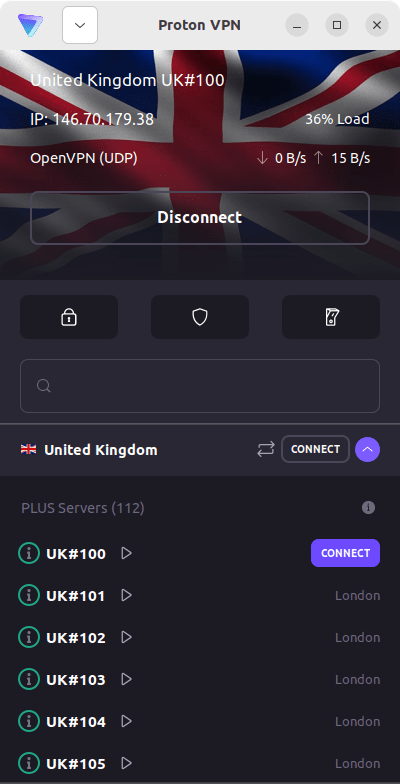
Connect to any of our Plus servers in the UK.
On our Android TV app, selecting any country will automatically connect you to a Plus server in that country if you have the right subscription.
Plus servers are available for Proton VPN Plus, Unlimited, Visionary or any of the family plans (Duo, Family).
Proton VPN does not condone the use of our VPN service to bypass copyright regulations.
Step 1:
Get a VPN Plus or Proton Unlimited subscription
If you already have a VPN Plus, Proton Unlimited(new window), Duo, Family, or Visionary (legacy users only) account, you can skip to step 2.
If you’re a new user, sign up for Proton VPN.
If you already have a Free plan, upgrade your account by signing in and selecting VPN Plus or Proton Unlimited from your account Subscription page.
Step 2:
Buy a UK TV license
If you already have a UK TV license, you can skip to step 3.
To watch BBC iPlayer on our VPN, you’ll need a valid UK TV license. Anyone who wants to stream content on BBC iPlayer will need a UK TV license. The standard license lasts for a year. If you have questions about whether you need a TV license or how to pay for one, the TV Licensing website(new window) is a helpful resource.
Step 3:
Install our VPN app
You need to download the Proton VPN app for your operating system. You can securely stream your favorite shows on Windows, macOS, Linux devices, Android TV, Apple TV, or on the go with your Android or iOS devices.
- Download the Proton VPN Windows app(new window)
- Download the Proton VPN macOS app(new window)
- Download the Proton VPN Linux app(new window)
- Download the Proton VPN Android app(new window)
- Download the Proton VPN iOS app(new window)
- Download Proton VPN for Android TV(new window)
- Download Proton VPN for Apple TV(new window)
For installation help, here are our support guides:
- Windows support guide
- macOS support guide
- Linux support guide
- Android support guide
- iOS support guide
- Android TV support guide
- Apple TV support guide
Step 4:
Start watching BBC iPlayer securely with Proton VPN!
Connect to a Plus server in the UK, log in to BBC iPlayer, then kick back and relax.
If you experience issues watching BBC iPlayer, please try the following:
- Restart Proton VPN application and VPN connection
- Clear your browser cache
- Use a different browser
- Restart your device
- Clear your DNS cache
BBC iPlayer may not always work. If you have tried all possible options and are still having issues, please check out our Streaming troubleshooting guide or contact our Support team.