


如何登入 Proton VPN
- 阅读
- 1 分钟
- 类别
- 帐户
要登入我们的应用和 Proton VPN 网站,您需要使用 Proton 帐户凭证。
If you’ve manually configured your device to connect to Proton VPN using OpenVPN, you’ll need to sign in using your OpenVPN username and password.
Proton 帐户详细信息
这些是您的 Proton 帐户凭证。您需要使用它们登入 Proton VPN 应用或我们的网站。
如果您拥有 Proton Mail 邮箱地址
您可以使用完整的电子邮件地址 (eric.norbert123@proton.me) 或用户名 (eric.norbert123)。
您的 Proton 帐户可用于全部 Proton 服务。如果您是为其他 Proton 服务(如 Proton Mail(新窗口)、Proton Drive(新窗口) 或 Proton Pass(新窗口))创建的帐户,且从未使用过 Proton VPN,仍然可以使用这些详细信息登入 Proton VPN。
如果您没有 Proton Mail 邮箱地址
如果您使用外部电子邮件地址创建了 Proton VPN 帐户,则需要在用户名字段中输入完整的电子邮件地址。
OpenVPN username and password
Your OpenVPN username and password are automatically generated for use with third-party VPN clients such as Tunnelblick for macOS and OpenVPN GUI for Windows. If you have trouble signing in with third-party OpenVPN applications, click here to solve the problem.
如果可能,我们建议使用适用于 Windows、macOS、Linux、iOS/iPadOS、Android、Apple TV、Android TV 和浏览器的官方 Proton VPN 应用。
For now, we continue to support manual IKEv2 configuration, but strongly recommend using OpenVPN or WireGuard® for manual configuration instead of IKEv2. If you manually configure a device using IKEv2, you’ll need to sign in using your OpenVPN username and password.
How to find your OpenVPN username and password
1. 在浏览器中,使用 Proton 帐户的用户名和密码(即在创建帐户时设置的用户名和密码,参见上文)登入 account.protonvpn.com。

2. In the menu on the left, go to Account → OpenVPN username
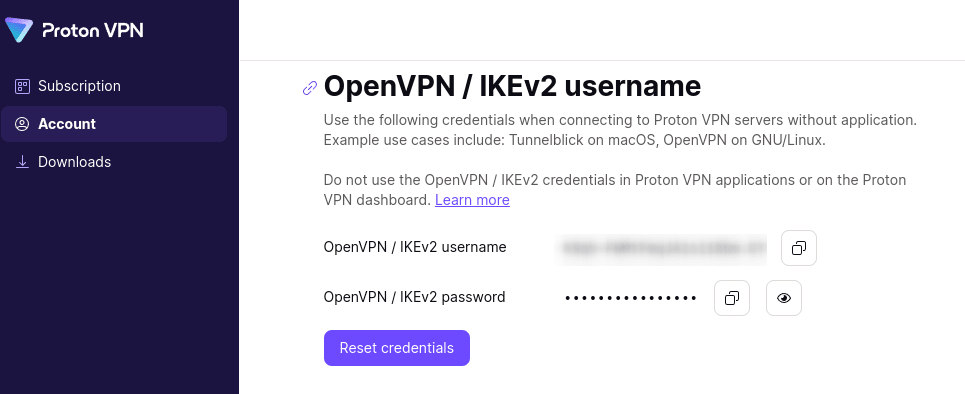
From here, you can copy your OpenVPN username and password.