


Proton VPNへのサインイン方法
- 閲覧中
- 1 分
- カテゴリー
- アカウント
アプリやProton VPNのウェブサイトにサインインするには、Protonアカウントの認証情報を使用する必要があります。
If you’ve manually configured your device to connect to Proton VPN using OpenVPN, you’ll need to sign in using your OpenVPN username and password.
Protonアカウントの詳細
これらはお客様のProtonアカウントの認証情報です。Proton VPNアプリ、または弊社のウェブサイトへのサインインに必要となります。
Proton Mailアドレスをお持ちの場合
メールアドレス全体(eric.norbert123@proton.me)またはユーザー名(eric.norbert123)を使用できます。
お客様のProtonアカウントは、すべてのProtonサービスでご利用いただけます。別のProtonサービス(Proton Mail(新しいウィンドウ)、Proton Drive(新しいウィンドウ)、Proton Pass(新しいウィンドウ)など)のアカウントを作成済みで、Proton VPNを一度も使用したことがない場合でも、これらの詳細情報を使用してProton VPNにサインインできます。
Proton Mailアドレスをお持ちでない場合
外部のメールアドレスでProton VPNアカウントを作成した場合は、ユーザー名フィールドにメールアドレス全体を入力する必要があります。
OpenVPN username and password
Your OpenVPN username and password are automatically generated for use with third-party VPN clients such as Tunnelblick for macOS and OpenVPN GUI for Windows. If you have trouble signing in with third-party OpenVPN applications, click here to solve the problem.
可能であれば、Windows、macOS、Linux、iOS/iPadOS、Android、Apple TV、Android TV、およびブラウザでは、公式のProton VPNアプリを使用することをお勧めします。
For now, we continue to support manual IKEv2 configuration, but strongly recommend using OpenVPN or WireGuard® for manual configuration instead of IKEv2. If you manually configure a device using IKEv2, you’ll need to sign in using your OpenVPN username and password.
How to find your OpenVPN username and password
1. ブラウザから、Protonアカウントのユーザー名とパスワード(アカウント作成時に設定したもの。上記参照)を使用して、account.protonvpn.comにサインインします。

2. In the menu on the left, go to Account → OpenVPN username
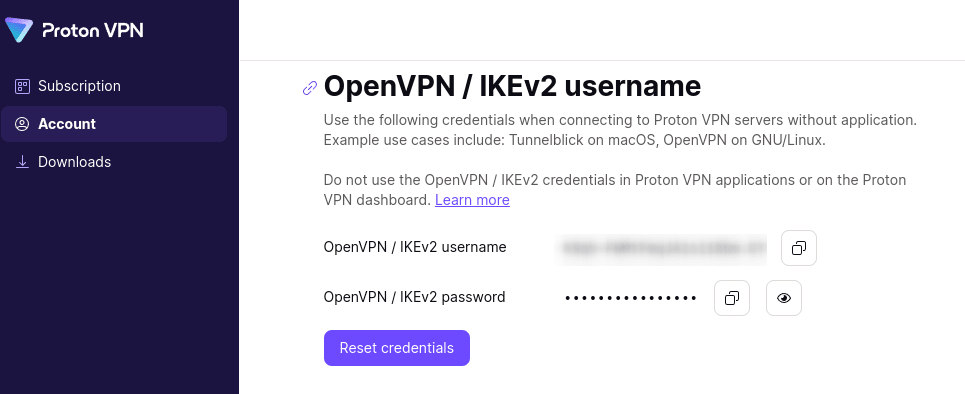
From here, you can copy your OpenVPN username and password.