


Proton VPN oturumu nasıl açılır
- Okuma süresi
- 2 dakikalık
- Kategori
- Hesap
Uygulamalarımızda ve Proton VPN web sitesinde oturum açmak için Proton Hesabı kimlik doğrulama bilgilerinizi kullanmanız gerekir.
If you’ve manually configured your device to connect to Proton VPN using OpenVPN, you’ll need to sign in using your OpenVPN username and password.
Proton Hesabı ayrıntıları
Bunlar Proton Hesabı kimlik doğrulama bilgilerinizdir. Proton VPN uygulamasında veya web sitemizde oturum açmak için bunlara ihtiyacınız olacaktır.
Bir Proton Mail adresiniz varsa
E-posta adresinizin tamamını (eric.norbert123@proton.me) veya kullanıcı adınızı (eric.norbert123) kullanabilirsiniz.
Proton Hesabınız tüm Proton hizmetlerinde geçerlidir. Hesabınızı başka bir Proton hizmeti (Proton Mail(yeni pencere), Proton Drive(yeni pencere) veya Proton Pass(yeni pencere) gibi) için oluşturduysanız ve daha önce hiç Proton VPN kullanmadıysanız Proton VPN’de oturum açmak için bu ayrıntıları yine de kullanabilirsiniz.
Bir Proton Mail adresiniz yoksa
Proton VPN hesabınızı harici bir e-posta adresiyle oluşturduysanız kullanıcı adı alanına e-posta adresinizin tamamını yazmanız gerekir.
OpenVPN username and password
Your OpenVPN username and password are automatically generated for use with third-party VPN clients such as Tunnelblick for macOS and OpenVPN GUI for Windows. If you have trouble signing in with third-party OpenVPN applications, click here to solve the problem.
Mümkün olduğunda; Windows, macOS, Linux, iOS/iPadOS, Android, Apple TV, Android TV ve tarayıcı için resmî Proton VPN uygulamalarını kullanmanızı öneririz.
For now, we continue to support manual IKEv2 configuration, but strongly recommend using OpenVPN or WireGuard® for manual configuration instead of IKEv2. If you manually configure a device using IKEv2, you’ll need to sign in using your OpenVPN username and password.
- IKEv2 hakkında ayrıntılı bilgi edinin
- OpenVPN hakkında ayrıntılı bilgi edinin
- WireGuard hakkında ayrıntılı bilgi edinin
How to find your OpenVPN username and password
1. Bir tarayıcıda, Proton Hesabı kullanıcı adınızı ve parolanızı (hesap oluşturma sırasında ayarladıklarınızı – yukarıya bakın) kullanarak account.protonvpn.com adresinde oturum açın.

2. In the menu on the left, go to Account → OpenVPN username
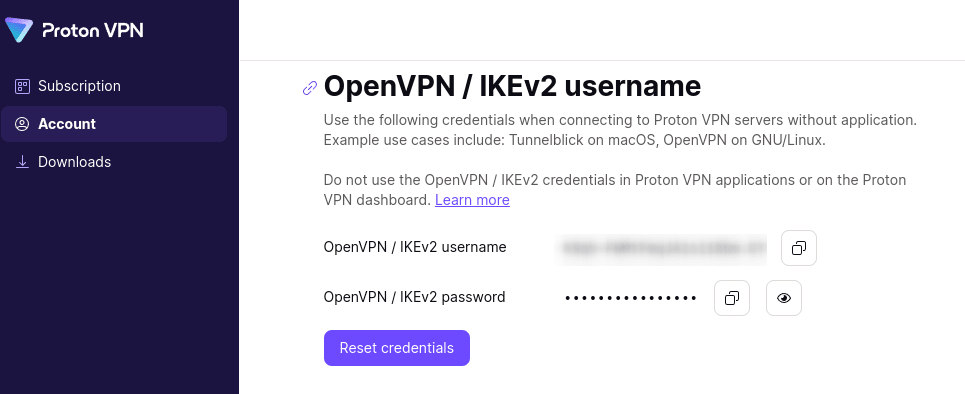
From here, you can copy your OpenVPN username and password.
Proton VPN kullanıcı bilgilerini saklar mı?