


วิธีเข้าสู่ระบบ Proton VPN
- เวลาอ่าน
- 1 นาที
- หมวดหมู่
- บัญชี
ในการเข้าสู่ระบบแอปและเว็บไซต์ Proton VPN ต้องใช้ ข้อมูลยืนยันตัวตนบัญชี Proton
If you’ve manually configured your device to connect to Proton VPN using OpenVPN, you’ll need to sign in using your OpenVPN username and password.
รายละเอียดบัญชี Proton
นี่คือข้อมูลยืนยันตัวตนบัญชี Proton ซึ่งต้องใช้ในการเข้าสู่ระบบ แอป Proton VPN หรือ เว็บไซต์
หากมีที่อยู่ Proton Mail
สามารถใช้ที่อยู่อีเมลแบบเต็ม (eric.norbert123@proton.me) หรือชื่อผู้ใช้ (eric.norbert123) ได้
บัญชี Proton สามารถใช้ได้กับบริการทั้งหมดของ Proton หากสร้างบัญชีสำหรับบริการอื่นของ Proton (เช่น Proton Mail(หน้าต่างใหม่), Proton Drive(หน้าต่างใหม่) หรือ Proton Pass(หน้าต่างใหม่)) และไม่เคยใช้ Proton VPN มาก่อน ก็ยังสามารถใช้รายละเอียดเหล่านี้เพื่อเข้าสู่ระบบ Proton VPN ได้
หากไม่มีที่อยู่ Proton Mail
หากสร้างบัญชี Proton VPN ด้วยที่อยู่อีเมลภายนอก จะต้องป้อนที่อยู่อีเมลแบบเต็มในช่องชื่อผู้ใช้
OpenVPN username and password
Your OpenVPN username and password are automatically generated for use with third-party VPN clients such as Tunnelblick for macOS and OpenVPN GUI for Windows. If you have trouble signing in with third-party OpenVPN applications, click here to solve the problem.
หากเป็นไปได้ ขอแนะนำให้ใช้ แอป Proton VPN อย่างเป็นทางการ สำหรับ Windows, macOS, Linux, iOS/iPadOS, Android, Apple TV, Android TV และเบราว์เซอร์
For now, we continue to support manual IKEv2 configuration, but strongly recommend using OpenVPN or WireGuard® for manual configuration instead of IKEv2. If you manually configure a device using IKEv2, you’ll need to sign in using your OpenVPN username and password.
- เรียนรู้เพิ่มเติมเกี่ยวกับ IKEv2
- เรียนรู้เพิ่มเติมเกี่ยวกับ OpenVPN
- เรียนรู้เพิ่มเติมเกี่ยวกับ WireGuard
How to find your OpenVPN username and password
1. ในเบราว์เซอร์ ให้เข้าสู่ระบบ account.protonvpn.com โดยใช้ชื่อผู้ใช้และรหัสผ่านบัญชี Proton (ข้อมูลที่ตั้งค่าไว้ระหว่างการสร้างบัญชี – ดูด้านบน)

2. In the menu on the left, go to Account → OpenVPN username
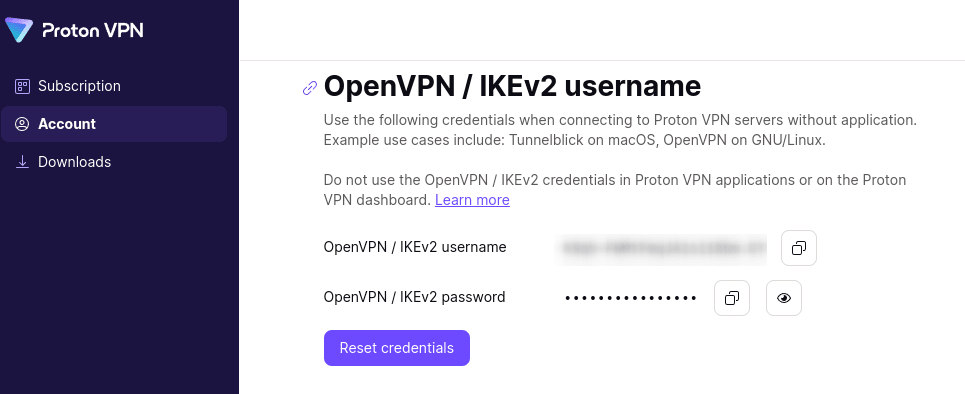
From here, you can copy your OpenVPN username and password.
Proton VPN จัดเก็บข้อมูลผู้ใช้หรือไม่?