


Proton VPN에 로그인하는 방법
- 읽기
- 1분
- 카테고리
- 계정
앱과 Proton VPN 웹사이트에 로그인하려면 귀하의 Proton 계정 자격 증명을 사용해야 합니다.
If you’ve manually configured your device to connect to Proton VPN using OpenVPN, you’ll need to sign in using your OpenVPN username and password.
Proton 계정 세부사항
이것은 귀하의 Proton 계정 자격 증명입니다. Proton VPN 애플리케이션 또는 저희 웹사이트에 로그인하려면 이 자격 증명이 필요합니다.
귀하에게 Proton Mail 주소가 있는 경우
귀하의 전체 이메일 주소(eric.norbert123@proton.me) 또는 사용자 이름(eric.norbert123)을 사용할 수 있습니다.
귀하의 Proton 계정은 모든 Proton 서비스에서 작동합니다. 다른 Proton 서비스(Proton Mail(새 창), Proton Drive(새 창) 또는 Proton Pass(새 창) 등)를 위해 계정을 생성했고 Proton VPN을 사용해 본 적이 없더라도, 이 세부사항을 사용하여 Proton VPN에 로그인할 수 있습니다.
Proton Mail 주소가 없는 경우
외부 이메일 주소로 Proton VPN 계정을 생성한 경우, 사용자 이름 필드에 귀하의 전체 이메일 주소를 입력해야 합니다.
OpenVPN username and password
Your OpenVPN username and password are automatically generated for use with third-party VPN clients such as Tunnelblick for macOS and OpenVPN GUI for Windows. If you have trouble signing in with third-party OpenVPN applications, click here to solve the problem.
가능한 경우 Windows, macOS, Linux, iOS/iPadOS, Android, Apple TV, Android TV 및 브라우저용 공식 Proton VPN 앱을 사용하실 것을 권장합니다.
For now, we continue to support manual IKEv2 configuration, but strongly recommend using OpenVPN or WireGuard® for manual configuration instead of IKEv2. If you manually configure a device using IKEv2, you’ll need to sign in using your OpenVPN username and password.
How to find your OpenVPN username and password
1. 브라우저에서 귀하의 Proton 계정 사용자 이름 및 비밀번호(계정 생성 시 설정한 정보 – 위 내용 참조)를 사용하여 account.protonvpn.com에 로그인합니다.

2. In the menu on the left, go to Account → OpenVPN username
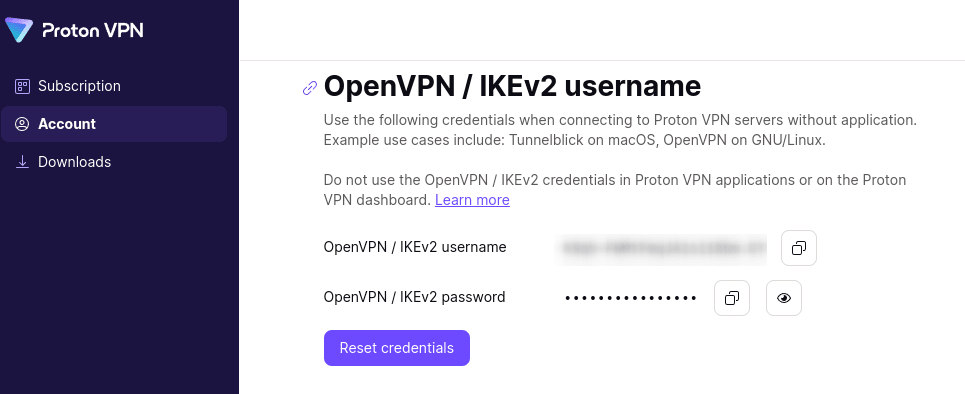
From here, you can copy your OpenVPN username and password.