


Comment se connecter à Proton VPN
- Lecture
- 2 minutes
- Catégorie
- Compte
Pour vous connecter à nos applications et au site internet de Proton VPN, vous devrez utiliser vos identifiants de compte Proton.
If you’ve manually configured your device to connect to Proton VPN using OpenVPN, you’ll need to sign in using your OpenVPN username and password.
Informations du compte Proton
Voici vos identifiants de compte Proton. Vous en aurez besoin pour vous connecter à l’application Proton VPN ou à notre site internet.
Si vous avez une adresse Proton Mail
Vous pouvez utiliser votre adresse e-mail complète (eric.norbert123@proton.me) ou votre nom d’utilisateur (eric.norbert123).
Votre compte Proton fonctionne pour tous les services Proton. Si vous avez créé votre compte pour un autre service Proton (comme Proton Mail(nouvelle fenêtre), Proton Drive(nouvelle fenêtre) ou Proton Pass(nouvelle fenêtre)) et que vous n’avez jamais utilisé Proton VPN auparavant, vous pouvez tout de même utiliser ces informations pour vous connecter à Proton VPN.
Si vous n’avez pas d’adresse Proton Mail
Si vous avez créé votre compte Proton VPN avec une adresse e-mail externe, vous devrez saisir votre adresse e-mail complète dans le champ du nom d’utilisateur.
OpenVPN username and password
Your OpenVPN username and password are automatically generated for use with third-party VPN clients such as Tunnelblick for macOS and OpenVPN GUI for Windows. If you have trouble signing in with third-party OpenVPN applications, click here to solve the problem.
Dans la mesure du possible, nous vous recommandons d’utiliser les applications officielles de Proton VPN pour Windows, macOS, Linux, iOS/iPadOS, Android, Apple TV, Android TV et navigateur.
For now, we continue to support manual IKEv2 configuration, but strongly recommend using OpenVPN or WireGuard® for manual configuration instead of IKEv2. If you manually configure a device using IKEv2, you’ll need to sign in using your OpenVPN username and password.
How to find your OpenVPN username and password
1. Dans un navigateur, connectez-vous à account.protonvpn.com en utilisant le nom d’utilisateur et le mot de passe de votre compte Proton (ceux que vous avez configurés lors de la création de votre compte – voir ci-dessus).

2. In the menu on the left, go to Account → OpenVPN username
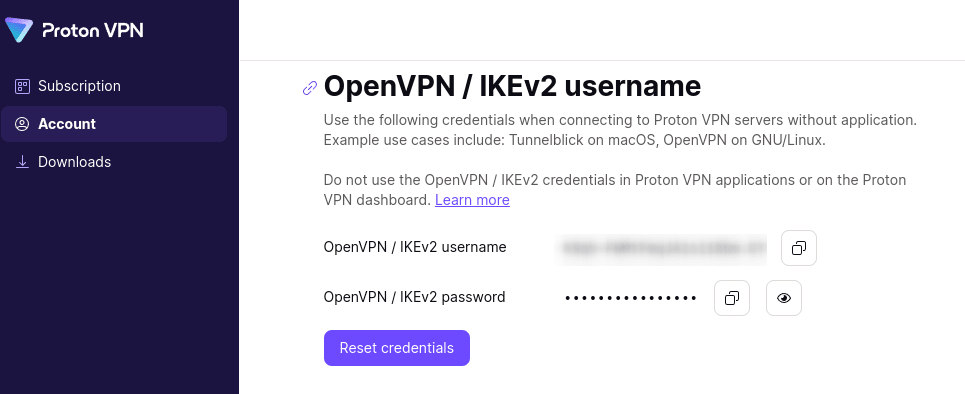
From here, you can copy your OpenVPN username and password.
Proton VPN stocke-t-il les informations des utilisateurs ?