


Hoe u inlogt bij Proton VPN
- Lezen
- 2 min
- Categorie
- Account
Om in te loggen bij onze apps en de website van Proton VPN heeft u uw Proton-accountinloggegevens nodig.
If you’ve manually configured your device to connect to Proton VPN using OpenVPN, you’ll need to sign in using your OpenVPN username and password.
Proton-accountgegevens
Dit zijn uw Proton-accountinloggegevens. U heeft deze nodig om in te loggen bij de Proton VPN-app of onze website.
Als u een Proton Mail-adres heeft
U kunt uw volledige e-mailadres (eric.norbert123@proton.me) of uw gebruikersnaam (eric.norbert123) gebruiken.
Uw Proton-account werkt voor alle Proton-diensten. Als u uw account heeft aangemaakt voor een andere Proton-dienst (zoals Proton Mail(nieuw venster), Proton Drive(nieuw venster) of Proton Pass(nieuw venster)) en nog nooit eerder Proton VPN heeft gebruikt, kunt u deze gegevens nog steeds gebruiken om in te loggen bij Proton VPN.
Als u geen Proton Mail-adres heeft
Als u uw Proton VPN-account met een extern e-mailadres heeft aangemaakt, moet u uw volledige e-mailadres invoeren in het gebruikersnaamveld.
OpenVPN username and password
Your OpenVPN username and password are automatically generated for use with third-party VPN clients such as Tunnelblick for macOS and OpenVPN GUI for Windows. If you have trouble signing in with third-party OpenVPN applications, click here to solve the problem.
Waar mogelijk raden we u aan de officiële Proton VPN-apps te gebruiken voor Windows, macOS, Linux, iOS/iPadOS, Android, Apple TV, Android TV en browser.
For now, we continue to support manual IKEv2 configuration, but strongly recommend using OpenVPN or WireGuard® for manual configuration instead of IKEv2. If you manually configure a device using IKEv2, you’ll need to sign in using your OpenVPN username and password.
How to find your OpenVPN username and password
1. Log in een browser in bij account.protonvpn.com met de gebruikersnaam en het wachtwoord van uw Proton-account (die u heeft ingesteld tijdens het aanmaken van uw account – zie hierboven).

2. In the menu on the left, go to Account → OpenVPN username
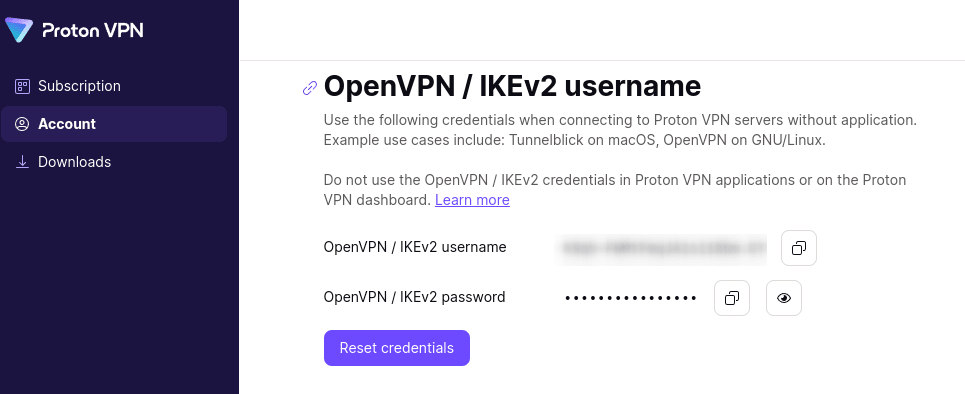
From here, you can copy your OpenVPN username and password.
Slaat Proton VPN gebruikersgegevens op?