


如何登入 Proton VPN
- 閱讀
- 1 分鐘
- 類別
- 帳號
若要登入我們的應用程式和 Proton VPN 網站,您需要使用您的 Proton 帳號憑證。
If you’ve manually configured your device to connect to Proton VPN using OpenVPN, you’ll need to sign in using your OpenVPN username and password.
Proton 帳號詳細資料
這些是您的 Proton 帳號憑證。您需要使用這些憑證來登入 Proton VPN 應用程式,或我們的網站。
如果您有 Proton Mail 位址
您可以使用完整的電子郵件地址 (eric.norbert123@proton.me) 或您的使用者名稱 (eric.norbert123)。
您的 Proton 帳號適用於所有 Proton 服務。如果您是為其他 Proton 服務(例如 Proton Mail(新視窗)、Proton Drive(新視窗) 或 Proton Pass(新視窗))建立了帳號,且以前從未使用過 Proton VPN,您仍可以使用這些詳細資料登入 Proton VPN。
如果您沒有 Proton Mail 位址
如果您使用外部電子郵件地址建立了 Proton VPN 帳號,則需要將完整的電子郵件地址輸入至使用者名稱欄位中。
OpenVPN username and password
Your OpenVPN username and password are automatically generated for use with third-party VPN clients such as Tunnelblick for macOS and OpenVPN GUI for Windows. If you have trouble signing in with third-party OpenVPN applications, click here to solve the problem.
在可能的情況下,我們建議使用官方的 Proton VPN 應用程式,適用於 Windows、macOS、Linux、iOS/iPadOS、Android、Apple TV、Android TV 和瀏覽器。
For now, we continue to support manual IKEv2 configuration, but strongly recommend using OpenVPN or WireGuard® for manual configuration instead of IKEv2. If you manually configure a device using IKEv2, you’ll need to sign in using your OpenVPN username and password.
How to find your OpenVPN username and password
1. 在瀏覽器中,使用您的 Proton 帳號使用者名稱和密碼(您在建立帳號時設定的名稱和密碼 – 請見上文),登入至 account.protonvpn.com。

2. In the menu on the left, go to Account → OpenVPN username
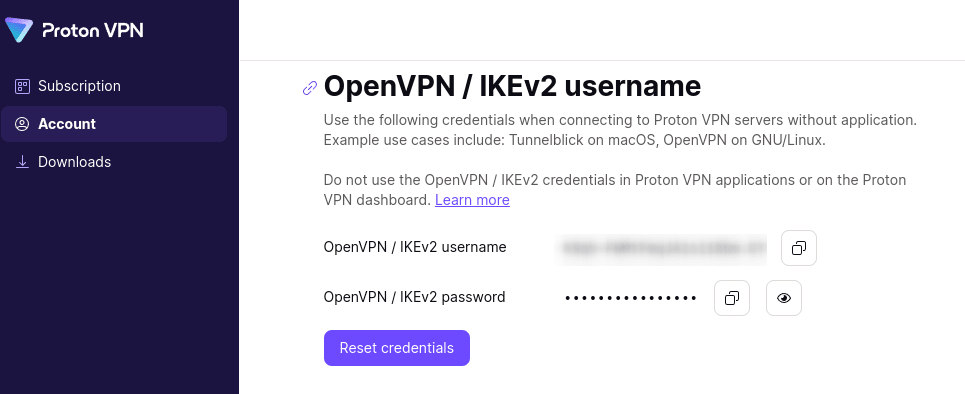
From here, you can copy your OpenVPN username and password.