


Understanding and increasing VPN connection speeds
- Reading
- 5 mins
- Category
- Speed
If your VPN connection feels slow, changing your server, your protocol or the time you connect can often help. This article explains what affects VPN speed, the steps that make the biggest difference, when our free servers are least busy, and how speeds compare across our free and paid plans(new window).
What affects VPN speed
A VPN sends your traffic through an encrypted tunnel over your existing internet connection, so your VPN speed can’t be faster than your base connection. Other factors that slow it down include:
- Your internet service provider (ISP). Your VPN is limited by how much data your ISP can handle and how quickly it moves that data across its network.
- Distance. The farther away the VPN server is, the higher your latency (the time it takes for data to travel from your device to the server and back), and the more network links your traffic crosses.
- Internet infrastructure problems. A fault anywhere between you and the server, such as a damaged undersea cable or maintenance by an upstream network provider, can cause congestion.
- ISP throttling. Some ISPs deliberately slow down VPN traffic, or throttle your whole connection if you use a lot of bandwidth.
- Server load. A busy server shares its capacity between more people, so speeds often drop at peak times.
Network conditions change constantly, so your speed can vary with your location, the server you choose, and the time you connect. A VPN can also route your traffic around a problem elsewhere on the internet, so some sites may occasionally load faster with the VPN than without it.
Use VPN Accelerator
VPN Accelerator is our own technology for reducing the speed loss caused by long distances and internet infrastructure problems. It can increase speeds by over 400% in certain situations.
VPN Accelerator is free on all plans and turned on by default in all our apps. If you’ve turned it off, turn it back on in your app’s settings.
How to get faster speeds on Proton VPN
Try these steps, starting with the first. Test your speed after each one so you know what made the difference.
- Turn off Secure Core if you don’t need it. Secure Core routes your traffic through an extra server, which adds a lot of latency. Most people don’t need the additional security afforded by Secure Core.
- Change server. Another server may avoid a bottleneck on the route to your current one. See how to pick a fast server.
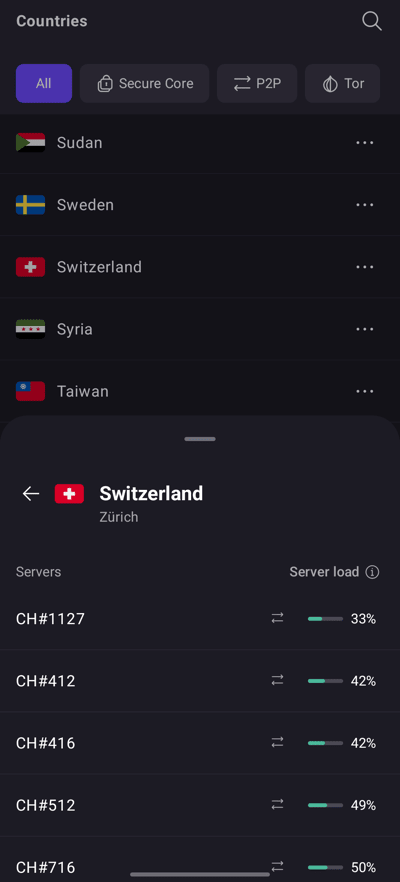
- Choose a server with a low load. Our apps show the current load on every server.
- Try a different VPN protocol. WireGuard® is usually our fastest protocol, and UDP is faster than TCP.
- Close apps that use a lot of data. File-sharing and torrenting apps running in the background can use up your bandwidth.
- Check your antivirus or firewall. Antivirus software and firewalls(new window) can sometimes slow VPN connections. Turn them off briefly, reconnect, and test your speed. Turn them back on afterwards.
- Update Proton VPN. New versions often include performance improvements. If you use a third-party client, keep it up to date.
How to pick a fast server
Paid plans
On any paid Proton VPN plan, you can connect to any of our 20,000+ servers in 140+ countries.
- Don’t use Tor servers unless you need to. Tor is very slow compared our VPN network.
- Pick a server number (#) at least 10 away from your current server. For example, from CH#1 to CH#21.
- Connect to a server close to you. A nearby server means lower latency and fewer chances of network problems along the way.
- Choose a server with a low load. Our apps show the current load on every server.

Proton VPN Free
On our Free plan, we automatically connect you to the fastest free server for your location. Our free servers are in the Netherlands, Poland, Romania, Norway, Switzerland, the United States, Canada, Mexico, Japan and Singapore.
If your connection is slow, select Change server to connect to a different free server. We choose the new server at random, and you’ll need to wait a short time before you can change again.

Learn more about changing servers on the Free plan
Connect when free servers are quieter
Our free servers are shared by many people, so they’re slower at busy times. The chart shows when free servers in each country are usually quiet (green), moderately busy (yellow) and busy (red).

View chart data
Percentage values for each category shown in the bar chart above.
| Free server location | Usually quiet (GMT) | Usually busiest (GMT) |
|---|---|---|
| Netherlands | 01:00–08:00 | 11:00–22:00 |
| Poland | 00:00–05:00 | 06:00–23:00 |
| Romania | 00:00–05:00 | 09:00–22:00 |
| Norway | 00:00–09:00 | 11:00–22:00 |
| Switzerland | 00:00–11:00 | 12:00–22:00 |
| USA (Eastern) | 00:00–14:00 | 19:00–21:00 (moderate) |
| USA (Central) | 00:00–15:00 | 18:00–21:00 (moderate) |
| USA (Pacific) | Most of the day | 19:00–21:00 (moderate) |
| Canada | 06:00–11:00 | 15:00–22:00 |
| Mexico | 04:00–19:00 | 20:00–23:00 (moderate) |
| Japan | 00:00–02:00 | 04:00–21:00 |
| Singapore | No quiet period | Most of the day |
For large downloads or video calls on the Free plan, try your region’s quiet hours. If you need fast speeds at any time of day, consider upgrading to a paid plan(new window).
Speeds on paid plans
Our paid servers are much less busy than our free ones, so if you have a paid plan, you’ll likely enjoy faster speeds.
- More servers. With over 20,000 servers, each one carries a lower load on average.
- More countries. You’re more likely to find a server in or near your city or country.
- Faster connections. Almost all our servers have 10 Gbps connections (everywhere except Cyprus and North Macedonia).
Speeds still depend on network conditions, so they can vary.
Still having speed issues?
We use high-performance servers in data centers with strong network connectivity. If a server is performing poorly, contact us(new window) and tell us which server you were connected to.