


अपना डिफॉल्ट कनेक्शन कैसे बदलें
- पढ़ने का समय
- 1 मिनट
- श्रेणी
- Proton VPN ऐप्स
आपका डिफॉल्ट कनेक्शन वो VPN कनेक्शन है जो आप हमारे ऐप्स में कनेक्ट बटन पे क्लिक या टैप करने पे बनाते हैं। जब तक आप इसे बदलते नहीं, आपका डिफॉल्ट कनेक्शन आपके स्थान के लिए सबसे तेज VPN सर्वर से होगा (जो आमतौर पे सबसे नज़दीकी होता है, लेकिन सर्वर लोड और नेटवर्क स्पीड जैसे अन्य कारक भी आपके लिए सबसे अच्छा सर्वर ऑटोमैटिक चुनने में अहम भूमिका निभाते हैं)।
हालांकि, अगर आप किसी भी पेड Proton VPN प्लैन पे हैं, तो आप हमारे Windows और मोबाइल ऐप्स पे अपना डिफॉल्ट कनेक्शन कस्टमाइज़ कर सकते हैं। इस गाइड में, हम आपको ये दिखाते हैं कि ये कैसे करें:
Windows
1. Open the app and go to Settings → Connection Preferences → Default connection

2. Click on the Default connection dropdown menu.

3. Select Fastest country, Random country, Last connection, or any connection from your Recents list (which can be a Secure Core connection or a profile). Click Apply when you’re done.

If you don’t want Fastest country to connect you to certain locations, you can exclude them. To do this:
Open the app and go to Settings → Connection Preferences → Excluded locations and select a country, city, or state from the dropdown list.

You can add multiple locations to exclude. Click Apply when you’re done.

Android
1. Open the app and go to Settings → Connection → Connection Preferences.

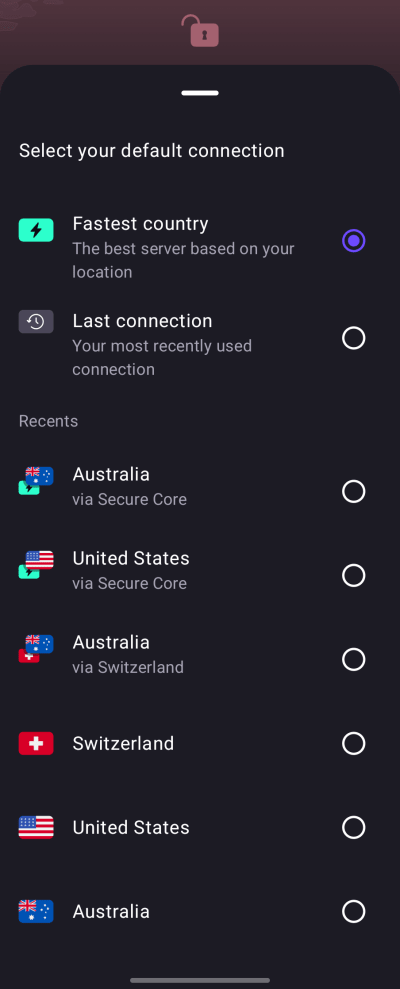
- Tap your current Default connection.

- Select Fastest country, Last connection, or any connection from your Recents list (which can be a profile).

If you don’t want Fastest country to connect you to certain locations, you can exclude them. To do this:
1. Open the app and go to Settings → Connection → Connection Preferences → Excluded locations → Select .

- Select a country, city, or state from the list.

You can add multiple locations to exclude.

iOS and iPadOS
1. ऐप खोलें और अगर VPN जुड़ा हुआ है, तो उसे डिस्कनेक्ट करें।
2. Tap Default connection ⏷.

3. अपना डिफॉल्ट कनेक्शन चुनें (जो कोई प्रोफाइल हो सकता है)।
The iOS and iPadOS app doesn’t currently support Excluded locations.