


如何更改默认连接
- 阅读
- 1 分钟
- 类别
- Proton VPN 应用
默认连接是指您在我们的应用中点击或轻点连接按钮时建立的 VPN 连接。除非您进行更改,否则默认连接将是您所在位置最快的 VPN 服务器(通常也是距离最近的服务器,但服务器负载和网络速度等其他因素也会影响系统自动为您选择最佳服务器)。
但是,如果您订阅了任意 Proton VPN 付费套餐,可以在我们的 Windows 和移动应用中自定义默认连接。本指南将向您展示如何在以下平台进行操作:
Windows
1. Open the app and go to Settings → Connection Preferences → Default connection

2. Click on the Default connection dropdown menu.

3. Select Fastest country, Random country, Last connection, or any connection from your Recents list (which can be a Secure Core connection or a profile). Click Apply when you’re done.

If you don’t want Fastest country to connect you to certain locations, you can exclude them. To do this:
Open the app and go to Settings → Connection Preferences → Excluded locations and select a country, city, or state from the dropdown list.

You can add multiple locations to exclude. Click Apply when you’re done.

Android
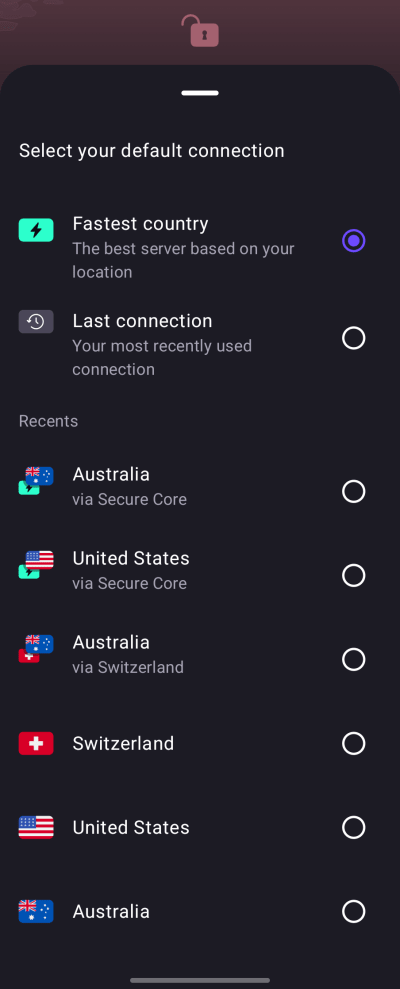
1. Open the app and go to Settings → Connection → Connection Preferences.

- Tap your current Default connection.

- Select Fastest country, Last connection, or any connection from your Recents list (which can be a profile).

If you don’t want Fastest country to connect you to certain locations, you can exclude them. To do this:
1. Open the app and go to Settings → Connection → Connection Preferences → Excluded locations → Select .

- Select a country, city, or state from the list.

You can add multiple locations to exclude.

iOS and iPadOS
1. 打开应用,如果 VPN 已连接,请先断开连接。
2. Tap Default connection ⏷.

3. 选择您的默认连接(可以是收藏)。
The iOS and iPadOS app doesn’t currently support Excluded locations.