Every device that connects directly to the internet is assigned an IP address by your internet service provider (ISP). In general, this number uniquely identifies your household, but there are ways to change that.
Most ISPs assign blocks of IP addresses to the same geographic areas, so your IP address is often a good indicator of your rough geographic location (accurate to around the city level). It’s also a common way that websites you visit can identify you and track your online activity.
TL;DR: How to change your IP address?
Proton VPN is the most reliable way to change your IP address for free. It instantly updates your IP across all traffic and keeps it private continuously rather than as a one-off fix.
As an open-source provider with a strict no-logs policy, Proton is the only reputable VPN with a truly unlimited free plan. Whether you stick with a free plan or upgrade, Proton makes it easy to hide your IP and keep your browsing private.
Why change your IP address?
There are several legitimate reasons you may want to change your IP address:
- You don’t want websites building a profile on you: Every site you visit can track your IP address. Over time, advertising networks use this to track your habits across unrelated sites to build a detailed profile of your habits. Hiding your IP address (by changing it) breaks that trail.
- You want to hide your real location while P2P torrenting: When using P2P file-sharing, your IP address is visible to all participants. Since your IP can be used to identify your approximate location and, in some cases, your identity, many people prefer to mask it before connecting to a torrent.
- You’re being blocked by a website or service: IP addresses can sometimes end up on a blocklist, such as in games or streaming. This sometimes happens when someone on the same IP address violates a service’s terms, or when the IP has been flagged by an automated system. This can lock you out of sites without explanation, even if you’ve done nothing wrong. Changing your IP is the easiest way to work around these IP-level blocks.
- You want to access websites that are blocked in your country: Governments and institutions sometimes restrict access to specific websites or online services. Connecting through a VPN server in a different location means your traffic appears to come from there, making blocked content accessible again.
- You want to stream your favorite home content when traveling: Many streaming services are only available in their home country, and international services typically offer different catalogs depending on your location. By changing your IP address to one in your home country, you can watch your favorite shows, local news, and sports events when away from home.
7 ways to change your IP address
Here are a few methods you can use to change your IP address:
1. Use a VPN
Pros:
- Works immediately and reliably
- Hides your internet activity from your ISP (and by extension, your government)
- IP address changes for all traffic
- Easy to use
Cons:
- You’re trusting the VPN provider with your traffic
- Not all VPNs are free, and most free ones can’t be trusted
- App download necessary
When you connect to a VPN, all your network traffic is channeled through a server run by your VPN provider, which in turn changes your IP address to that of the VPN server. VPN traffic is also encrypted, which hides your online activity from third parties like your ISP and network administrators. It’s the only method that lets you choose which country your new IP appears to come from.
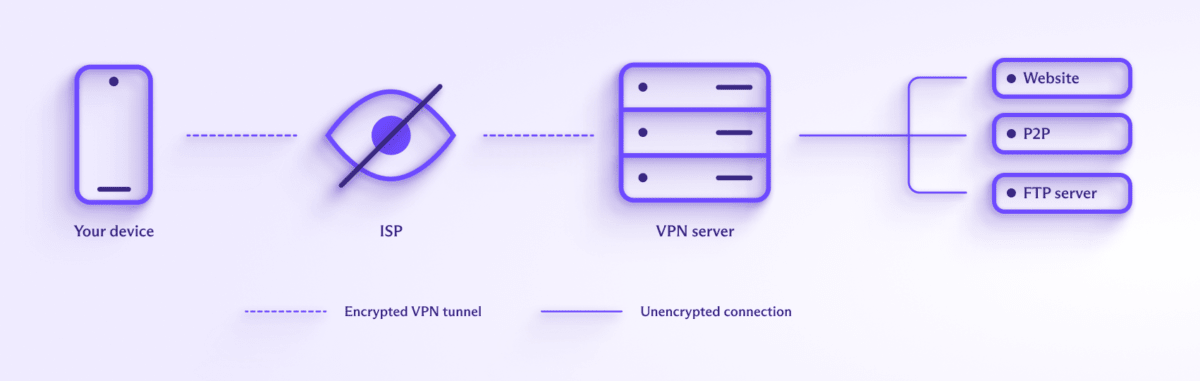
But using a VPN means shifting your trust from your ISP to the VPN provider, which makes choosing the right one important — pick one that doesn’t log your activity and be sure to research their privacy practices. Many free VPNs fund themselves by selling your browsing data, and some are outright malware(new window).
Proton VPN is the only reputable VPN service with a 100% free plan that offers:
- No logs
- No ads
- No bandwidth restrictions
- No artificial speed restrictions
Proton offers our free service because we believe that everyone deserves online privacy. Our free service is supported by our paid plans, which provide IP addresses in over 120 countries worldwide, offer dedicated P2P BitTorrent servers, and allow you to access a wide range of popular streaming services.
- Restart your router or modem
Pros:
- No setup or software required
- Very easy to do
Cons:
- Not guaranteed to work
- New IP is still linked to your account
Your modem’s IP address (or your router’s IP address, depending on your setup) is assigned by your ISP. Most ISPs use dynamic IP provisioning, meaning they hand out addresses from a shared pool rather than permanently assigning you one.
Instead of just pressing the restart button, turn the router or modem off for at least 30 seconds. This might prompt your ISP to issue a different address when the device reboots and reconnects. That said, whether it works depends on your ISP and how long your current IP lease has to run. Even if you do manage to change your IP, the new address is still traceable back to you through your ISP, so this method doesn’t help with privacy.
- Use Tor
Pros:
- Strong anonymity
- No sign-up required
Cons:
- Drastically reduced speeds
- Many websites block Tor traffic
- You cannot choose your exit node
Tor is a free tool designed to defeat censorship and provide true anonymity on the internet. When you use Tor browser (or access the Tor network via Proton VPN’s Tor over VPN feature), your connection is randomly routed through at least three Tor “nodes”.
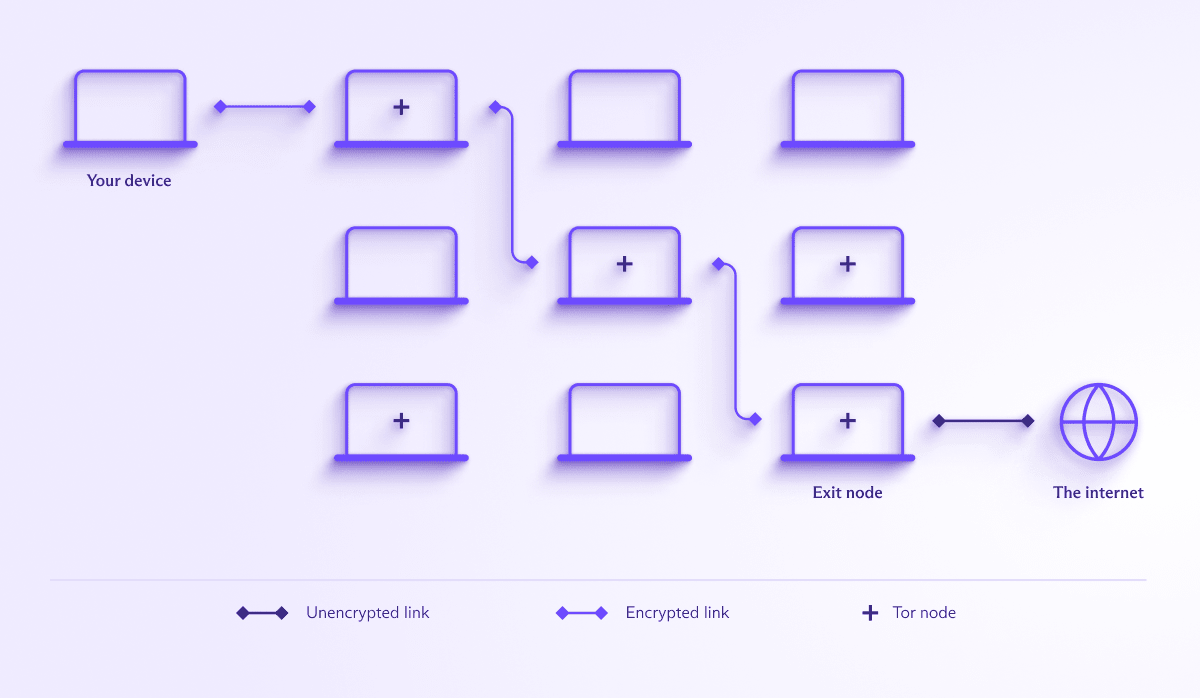
The only IP address that’s visible is that of the final node. Each node only knows the step before and after it, so no single party can see both who you are and what you’re accessing. This makes Tor particularly strong for situations where anonymity genuinely matters, such as for journalists(new window), activists, or anyone in a country where internet use is surveilled or restricted.
But as an IP changing tool? There are limitations. For one, you have no control over which country your exit node is in — making it a bad fit if you need an address from a specific one. And because traffic passes through three separate servers around the world, it’s incredibly slow. Expect to lose 90% or more of your normal connection speed, making streaming or downloading large files really difficult.
- Switch to a different WiFi network
Pros:
- Instant workaround
Cons:
- Public WiFi is usually unsecured
- Your IP changes, but stays within the same geographical location
Arguably, the simplest method to change your IP address is to connect to a different network. Your IP comes from whichever network you’re connected to, so when you switch a library’s WiFi, for example, you’ll get their IP address.
However, WiFi hosts often monetize their service by selling your browsing history to adtech companies. Using a VPN on public WiFi prevents this.
- Contact your ISP
Pros:
- Simple workaround
Cons:
- Your ISP may decline the request
- New IP is still linked to your account
- Dealing with your ISP’s customer service
Another option is asking your ISP to issue you a new IP address. Not all ISPs will be open to doing this, and you may need to explain why you want it done. But there’s no harm in asking. Again, be aware that this new IP address can be used to easily identify you and track you, just as your old IP address.
Some ISPs offer static IP(new window) addresses. These are not dynamically provisioned, so you will always have the same IP address. However, static IPs are usually only available to businesses and not people on residential contracts. They’re also generally not free.
- Use VPNGate
Pros:
- A large number of free servers
Cons:
- No reliable way to verify logging practices
- University of Tsukuba collects a lot of metadata
- Very slow outside of East Asia
VPNGate(new window) is a volunteer-run distributed VPN network developed primarily as an anti-censorship tool by the University of Tsukuba in Japan. Thousands of volunteer-run servers are available across the world, with the majority in Japan and other parts of Asia. A few servers are also available in Europe and the Americas.
The strength of VPNGate is the sheer number and turnover of servers. Their volume and transitory nature make it difficult for authoritarian governments to block them all, making it useful as a censorship bypass. Connection speeds from outside East Asia are generally poor, and the University of Tsukuba itself retains connection logs for at least three months. Individual volunteer servers state their own logging policies, but there’s no way to verify them.
- Set up a personal VPN server
Pros:
- Full control of your server
- Useful for accessing your home IP remotely
Cons:
- Technical know-how is required
- Your VPN’s IP is easily traced
- Potential costs of renting server space
If you have the technical know-how, you can configure your own VPN server on hardware you own, such as a spare computer or a home server, or on rented cloud infrastructure. As with a shared VPN, this setup ensures your ISP cannot see what you do online and changes your IP address to that of the VPN server you have set up.
But the privacy downsides of a personal VPN are significant. By definition, such a server would have very few users — usually it’s just you. This makes it a lot easier to trace the server’s IP address back to you. Whereas a shared VPN like Proton VPN provides stronger anonymity because thousands of users share the same IP address.
How to see if your IP address has changed
Before changing your IP address, you need to first know what your current address is — our free secure IP scanner is a great way to check. You’ll be able to see your current IPv4 address, approximate geographic location, IPv6 address, and more.
Next, change your IP address using a VPN or one of the other methods above. Then, go back to the IP scanner and refresh the page. If you’re using a proxy-based solution(new window) (including a VPN) to hide your IP address, you should see the proxy server’s information and not your real IP address.

If you use a proxy-based solution (including a VPN) to hide your IP address, you should see the proxy server’s information and not your real IP address.
Change your IP address with Proton VPN
The most reliable way to change your IP address is using Proton VPN. Our no-logs policy has been independently audited, our apps are open source, and we’re based in Switzerland — outside the jurisdiction of US and EU surveillance programs. When you use Proton VPN to change your IP address, you can trust that it works and that your real IP remains private.
Frequently asked questions about IP addresses
When most people talk about changing their IP address, they mean changing the public one. Your public IP address is assigned by your ISP and is what the rest of the internet sees. Every device on your home network shares the same public IP. Your local IP address is assigned by your router to your different devices. None of these local addresses is visible to the wider internet.
You can think of a public IP address as the address of your house that people use to find you. Whereas a local IP address is like the labels of the rooms inside your house. Only the people inside the home use them and know which room is which.
No, it is not illegal in most countries. In some countries with restrictive internet policies, access to VPN services and Tor may be blocked. It is always best to check local laws if you’re unsure.
es, any VPN replaces your public IP with the server’s. The concern with most free VPNs is that they fund themselves by logging and selling your browsing data.
Proton VPN is the only reputable VPN to offer a 100% free VPN service with no logs and no data limits.
You might, as the IP address you change to may have many other users. This is especially true if you are using a free service. When Google or other online services see an unusually high number of requests from a specific IP address, they ask for human verification to ensure you are not a bot.