Se você suspeita que alguém bloqueou você no Instagram, só existe uma maneira real de ter certeza: perguntando diretamente para a pessoa. Caso contrário, o Instagram faz um bom trabalho ao evitar que usuários bloqueados descubram o que aconteceu. Claro que existem sinais e maneiras de descobrir, o que também é útil saber se você planeja bloquear alguém, como no caso de stalkers do Instagram.
Neste artigo, veremos como bloquear alguém no Instagram e como saber se alguém bloqueou você.
- O que acontece quando você bloqueia alguém no Instagram
- Como bloquear alguém no Instagram
- Como saber se alguém bloqueou você no Instagram
- Como se manter seguro no Instagram
- As configurações de privacidade do Instagram não são suficientes
O que acontece quando você bloqueia alguém no Instagram
Bloquear alguém no Instagram impede que essa pessoa siga você e veja suas publicações, stories e lista de seguidores. Ela não poderá ver novas publicações e stories que você compartilhar daqui para frente, e não poderá mais enviar mensagens para você.
Em alguns casos, um usuário bloqueado ainda pode visualizar suas curtidas e comentários antigos em publicações de outras pessoas, mas não receberá uma notificação informando que você o bloqueou.
Em vez disso, a maioria dos usuários descobre que foi bloqueada ao investigar um pouco ou após perceber que não viu seu perfil aparecer no feed recentemente. Se eles costumam pesquisar pelo seu perfil, provavelmente notarão que não conseguem mais encontrá-lo.
Como bloquear alguém no Instagram
Para bloquear alguém no Instagram, acesse o perfil da pessoa e clique nos três pontos (…) no canto superior direito da tela. Isso abre um menu que permite denunciar, restringir ou bloquear a conta dela. Você também pode ocultar seu story desse usuário específico, removê-lo como seguidor ou ver a atividade compartilhada entre vocês.

A outra maneira de bloquear um usuário do Instagram é pelas configurações do aplicativo:
1. Role até a seção Quem pode ver seu conteúdo e toque em Bloqueados.

2. Clique no sinal de mais (+) no canto superior direito da tela e digite o nome de usuário ou pesquise para adicioná-lo à sua lista de bloqueados.

Se mudar de ideia mais tarde, você pode acessar essa seção novamente e tocar em Desbloquear em cada perfil do Instagram.
Como saber se alguém bloqueou você no Instagram
A única maneira garantida de saber se você foi bloqueado é perguntar diretamente à pessoa, embora isso possa gerar uma conversa um tanto desconfortável.
Se você quer saber como descobrir quem bloqueou você no Instagram sem perguntar, vários sinais podem ajudar:
Pesquise pelo perfil da pessoa: você não conseguirá encontrar o nome de usuário e o perfil dela na sua lista de seguindo. Tente sair do aplicativo ou usar o Instagram no modo de navegação anônima / privada antes de verificar o perfil. Se o perfil aparecer quando você não estiver conectado, mas não quando estiver com a sessão iniciada, esse é um forte indício de que você foi bloqueado.
Verifique seu histórico de mensagens: se você já enviou mensagens para a pessoa antes, sua conversa continuará na sua pasta de mensagens, a menos que você a tenha excluído. Se o nome de usuário e a imagem de perfil dela ainda aparecerem, você não foi bloqueado. Mas se o chat mostrar um avatar genérico sem nome de usuário e você não conseguir mais enviar mensagens no tópico, é provável que tenha sido bloqueado.
Procure por curtidas e comentários antigos: quando alguém bloqueia você, o Instagram remove as curtidas e comentários dessa pessoa de suas publicações. Dê uma olhada nas suas publicações para ver se essas interações ainda estão visíveis.
Tente seguir a pessoa novamente: se você conseguir encontrar e seguir a conta de novo, pode ser que ela tenha apenas removido você da lista de seguidores dela, em vez de ter bloqueado você.
Consulte uma conexão em comum: pergunte a alguém que também segue essa pessoa se ainda consegue ver a conta e enviar mensagens para ela. Se sim, é provável que você tenha sido bloqueado.
Como se manter seguro no Instagram
Bloquear alguém não é a única maneira de aumentar sua segurança e privacidade no Instagram. O aplicativo permite determinar quem pode ver suas publicações e stories, e quem pode enviar mensagens para você. Se você se preocupa com seu filho usando esse aplicativo de rede social, configure o controle dos pais no(nova janela) Instagram para limitar o uso e as interações.
E como o aplicativo da Meta costuma aparecer em notícias sobre problemas de privacidade e segurança — como os e-mails de redefinição de senha do Instagram (nova janela) e a remoção do gerador de imagens por IA da Meta do Instagram(nova janela) após repercussão pública negativa —, você deve reforçar suas configurações de privacidade:
Defina seu perfil como privado
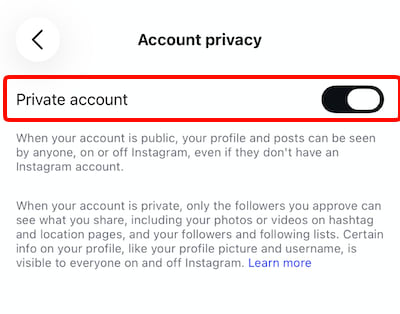
Você pode deixar seu perfil, publicações, stories e lista de seguidores públicos para qualquer pessoa ver, ou pode torná-lo privado, de modo que apenas seguidores aprovados possam ver suas informações e mídias.
Veja como tornar seu perfil do Instagram privado:
1. Clique nas três linhas no canto superior direito da página do seu perfil.
2. Selecione Configurações e atividade.
3. Role até a seção Quem pode ver seu conteúdo e toque em Privacidade da conta.
4. Ative a configuração Conta privada.
Saiba mais sobre como bloquear stalkers no Instagram
Restringir alguém em vez de bloquear
Em some casos, você pode querer limitar o contato com alguém sem bloquear a pessoa. Isso é possível por meio do recurso de restrição do Instagram:
- Usuários restritos não conseguem ver quando você está ativo no Instagram e não saberão se você leu as mensagens deles.
- As mensagens de usuários restritos vão para uma pasta separada chamada Solicitações de mensagem, que você pode visualizar ou ignorar quando quiser.
- Os comentários que eles deixarem em suas publicações e reels ficarão visíveis apenas para você e o usuário restrito, a menos que você decida aprová-los para que outros vejam.
- Você não receberá notificações quando a conta restrita comentar em seu conteúdo.
Para restringir alguém, vá em Configurações e atividade → Restritos, pesquise pela conta do Instagram e toque em Restringir.

Se mudar de ideia mais tarde, basta refazer o caminho para remover a pessoa da sua lista de contas Restritas.
Defina limites temporários para usuários
O recurso Limitar interações do Instagram funciona de forma semelhante a restringir alguém, mas apenas para certas interações e por um período definido. Ele oculta temporariamente comentários e novas mensagens e evita respostas a stories, marcações e menções de grupos selecionados, como seguidores recentes e contas que não seguem você. O aplicativo enviará uma notificação automática para remover essas interações limitadas após o período especificado por você.
Você também pode limitar todas as pessoas, exceto as da sua lista de amigos próximos.
Acesse Configurações e atividade → Limitar interações para decidir o que e quem será limitado, e por quanto tempo.

Aproveite ao máximo sua lista de Amigos Próximos
Muitos usuários do Instagram seguem uma variedade de contas, incluindo amigos, familiares, colegas de trabalho, empresas, sites de notícias e até desconhecidos. Às vezes, essa lista pode incluir contas que você não se lembra de seguir. Para compartilhar conteúdos selecionados com um público menor, use o recurso Amigos Próximos. Ele permite que você:
- Crie uma lista privada de seguidores, onde você pode adicionar ou remover pessoas a qualquer momento
- Limite publicações individuais, notas, reels e stories para as pessoas dessa lista
- Quando alguém da sua lista de Amigos Próximos visualizar um story compartilhado com esse grupo, essa pessoa verá um círculo verde ao redor da sua foto de perfil e um marcador de Amigos Próximos.
- As pessoas na sua lista de Amigos Próximos não podem ver quem mais está incluído. No entanto, interações com conteúdos dos Amigos Próximos podem revelar que membros individuais também estão na lista.
Para ajustar sua lista de Amigos Próximos, acesse Configurações e atividade → Amigos Próximos. Marque as caixas ao lado dos contatos do Instagram que você gostaria de adicionar à sua lista de Amigos Próximos e toque em Concluir. Ao publicar algo no Instagram, verifique a configuração de Público e selecione Amigos Próximos antes de compartilhar.

As configurações de privacidade do Instagram não são suficientes
Nenhuma combinação de configurações pode tornar o Instagram totalmente privado. Recursos como contas privadas, Bloqueados, Amigos Próximos, Restritos e Limitar interações ajudam a controlar quem pode visualizar ou interagir com seu conteúdo, mas a Meta ainda controla a plataforma. Ela pode alterar ou remover recursos de privacidade, mudar o funcionamento deles ou introduzir novos recursos que criam riscos de privacidade adicionais. Por exemplo:
- Conversas privadas podem ser acessadas pela Meta, pois a empresa encerrou a criptografia de ponta a ponta no Instagram(nova janela) em maio de 2026, e esse conteúdo pode ser compartilhado com as autoridades judiciais em resposta a solicitações legais.
- As mensagens temporárias também não devem ser consideradas totalmente privadas, já que o Instagram permite que elas sejam denunciadas por até 14 dias após desaparecerem.
- Mesmo sinais visíveis de privacidade podem não ser confiáveis. Os assinantes do Instagram Plus podem visualizar stories anonimamente(nova janela), de modo que você pode não saber sempre quem visualizou seu conteúdo.
Trate tudo o que for compartilhado no Instagram como conteúdo que pode ser acessado além do público pretendido. Para uma privacidade mais forte, considere aplicativos europeus de redes sociais(nova janela) com práticas de dados transparentes e uma boa VPN que protege sua conexão sempre que você estiver on-line.