


How to install the Proton VPN APK
- Reading
- 3 mins
- Category
- Android
If you are unable or prefer not to download Proton VPN for Android from the Google Play store, you can download it from F-droid(new window) or as an APK.
What is an APK?
APK stands for Android Package Kit. It is the file format used by the Android operating system to distribute and install mobile applications.
It’s the installer package for Android apps. Think of it like the .exe file on Windows or the .dmg file on macOS.
How to install an APK
Note that instruction details may vary across different Android devices, but they should be similar. This guide was created using a Samsung OneUI 8.0 phone.
1. On your phone or tablet, visit the Proton VPN Github page(new window) and download the APK of the latest version of Proton VPN for Android. Do not download our APK from any other source.

2. Once downloaded, you may be able to open the APK directly in your browser, or you can open it from your Downloads folder using a file manager app.
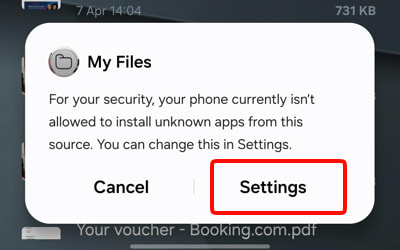
As a security measure, by default Android doesn’t allow apps to open APKs. To change this, at the security notification, tap Settings. You only need to do this once for each app you use to open APK files with.
Toggle the Allow permission switch on and then tap Install.

You can now Open the app.

Learn how to use Proton VPN on Android
How to update the APK app
APKs do not update themselves. To update Proton VPN when downloaded as an APK, simply revisit our GitHub page, download and latest version and open it. You will now be given the option to Update.
