


Cómo ver TV Azteca con Proton VPN
- Lectura
- 4 min
- Categoría
- Guías de streaming
TV Azteca es la principal emisora de televisión abierta de México y uno de los mayores productores de programación en español del mundo. Su servicio de streaming, TV Azteca En Vivo, ofrece contenido en vivo de sus canales de televisión terrestre (Azteca UNO, Azteca 7, adn Noticias, a más+), canales de streaming en vivo exclusivos digitales y programas bajo demanda como Ventaneando y Venga La Alegría.
En cuanto a los deportes, TV Azteca cubre fútbol, incluidos partidos de la Copa del Mundo de 2026, boxeo, NFL, NBA y más. En esta guía, analizamos cómo ver TV Azteca con Proton VPN en:

También puedes usar Proton VPN para desbloquear otros servicios de streaming populares, como Amazon Prime Video, Paramount+, Disney+ y (HBO) Max. Utiliza nuestro centro de streaming para encontrar todos los servicios para los que ofrecemos soporte.
Para utilizar servicios de streaming a través de Proton VPN, necesitarás un plan de pago de Proton VPN. Si ya tienes un plan Proton VPN Free, puedes mejorar tu cuenta iniciando sesión y seleccionando Plus (o cualquier otro plan de pago) en el panel de control de tu cuenta.
Si no tienes una cuenta de Proton VPN, puedes registrarte en un plan Plus o Unlimited.
Cómo ver TV Azteca con Proton VPN desde tu navegador
1. Si aún no lo has hecho, descarga e instala Proton VPN en tu dispositivo.
2. Inicia sesión en Proton VPN y conéctate a cualquier servidor VPN de México.

3. Ve al sitio web de TV Azteca En Vivo(ventana nueva).
4. Empieza a ver tus noticias, televisión en vivo y películas mexicanas favoritas de forma segura.
Nota: Para la cobertura deportiva en vivo, tu experiencia en el navegador puede ser inconsistente. Actualmente, una página web (ventana nueva)funciona principalmente como un portal de noticias deportivas, en lugar de como una página de streaming para eventos deportivos. Para disfrutar de un streaming de deportes en vivo confiable, usa la aplicación móvil de TV Azteca Deportes (ver más abajo), en lugar de un navegador.
Cómo ver TV Azteca En Vivo y Azteca Deportes con Proton VPN en un dispositivo móvil
Además de la aplicación de TV Azteca En Vivo, existe una aplicación independiente de TV Azteca Deportes dedicada a la cobertura de eventos deportivos:
- TV Azteca En Vivo: Android(ventana nueva), iOS e iPadOS(ventana nueva)
- TV Azteca Deportes: Android(ventana nueva), iOS e iPadOS(ventana nueva)
Es posible que necesites descargarlas antes de salir de México.
1. Si aún no lo has hecho, tendrás que descargar e instalar Proton VPN en tu dispositivo.
2. Inicia sesión en Proton VPN y conéctate a cualquier servidor VPN de México.
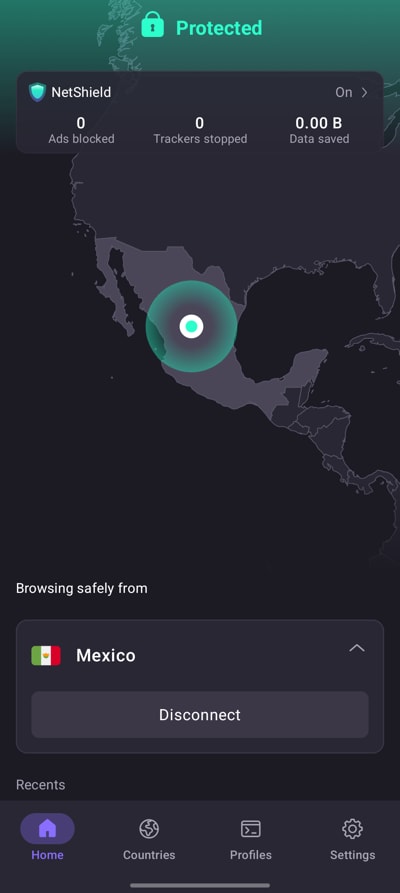
3. Descarga la aplicación de TV Azteca En Vivo o de Azteca Deportes.
4. Empieza a ver tus noticias, televisión en vivo y películas (o deportes) mexicanas favoritas de forma segura.
Cómo ver TV Azteca con Proton VPN en tu smart TV
Además de la aplicación de TV Azteca En Vivo, existe una aplicación independiente de TV Azteca Deportes dedicada a la cobertura de eventos deportivos.
Las aplicaciones de TV Azteca En Vivo y Azteca Deportes están disponibles para Android TV, Amazon Fire TV (basado en Android, también conocido como “firestick”) y Apple TV. Sin embargo, es posible que necesites descargarlas antes de salir de México.
1. Descarga Proton VPN para:
2. Inicia sesión en Proton VPN y conéctate a cualquier servidor VPN de México.
3. Abre la aplicación de TV Azteca En Vivo o de Azteca Deportes.
4. Empieza a ver tus noticias, televisión en vivo y películas (o deportes) mexicanas favoritas de forma segura.
Resolución de problemas de streaming con TV Azteca
Si TV Azteca no funciona después de seguir los pasos anteriores, prueba las siguientes opciones de resolución de problemas:
- Reinicia la aplicación Proton VPN e inicia una nueva conexión VPN.
- Si accedes a TV Azteca a través de tu navegador, prueba a borrar la caché de tu navegador.
- Reinicia tu dispositivo.
- Borra la caché DNS (Windows, Mac o Linux).
Si ninguna de estas opciones funciona, consulta nuestra guía de resolución de problemas de streaming o ponte en contacto con nuestro equipo de soporte.