2026 Dünya Kupası geldi! 48 takımın katılımıyla genişletilen yeni turnuva 11 Haziran 2026’da başlayacak ve 19 Temmuz’daki finale kadar devam edecek. Tüm maçlar ev sahibi üç ülke olan Kanada, Meksika ve Amerika Birleşik Devletleri’nde oynanacak; İngiltere, İspanya, Brezilya, Arjantin, Fransa ve Almanya da dahil olmak üzere en büyük ülkelerin birçoğuna yer verme özelliğini taşıyacak. Ancak üst üste üçüncü kez turnuvaya katılmaya hak kazanamayan İtalya bu ülkeler arasında yer almıyor.
Seyahat ediyorsanız futbolseverler (Amerikalılar için soccer), neredeyse her yerden resmi yayıncı uygulamaları, canlı TV hizmetleri veya genel yayın akışı platformları aracılığıyla Dünya Kupası canlı yayın akışı izlemek için erişim sağlayabilirler.
Büyük santra vuruşundan önce spor yayın akışı izlemek için uygulamalarınızı ve aygıtlarınızı ayarlamak, dünyanın en büyük futbol turnuvası başladığında yaşanabilecek birçok hayal kırıklığını önleyecektir. Yurt dışına seyahat ederken bile favori takımınızı kendi dilinizde tıpkı evinizdeymiş gibi nasıl izleyebileceğinizi burada bulabilirsiniz.
- Dünya Kupası maçları ücretsiz olarak nasıl izlenir
- Proton VPN ile seyahat ederken canlı Dünya Kupası maçları nasıl izlenir
- 2026 Dünya Kupası yayın akışını her yerden güvenli bir şekilde izleyin
- Sıkça sorulan sorular
Editörün notu: Proton VPN’in FIFA veya diğer Dünya Kupası etkinlik düzenleyicileri ile herhangi bir ilişkisi yoktur. Telif hakkı yasalarını ihlal etmek amacıyla kullanılmamalıdır. Kullanmak istediğiniz yayın akışı izleme platformunda yasal ve resmi bir hesabınız olduğundan emin olun ve platformun Hizmet Şartları’na uyun.
Seyahat ederken kendi dilinizde Dünya Kupası maçları nasıl izlenir
Resmi yayıncı uygulamaları
İngiltere’deki BBC iPlayer, Avustralya’daki SBS On Demand ve İspanya’daki RTVE Play gibi yayıncılar ücretsiz Dünya Kupası yayın akışı izleme olanağı sunmaktadır. Resmi Dünya Kupası yayın akışı izleme uygulamalarının neredeyse tamamı iPhone, Android, tabletler, akıllı televizyonlar ve web tarayıcılarını desteklemektedir ancak kullanılabilirlik ülkeye ve yerel yayın haklarına göre değişiklik gösterir.
Bir TV anteni ile
Bazı ülkeler, seçilen Dünya Kupası maçlarını geleneksel televizyon ağları üzerinden yayınlamaya devam etmektedir. ABD’de dijital anteni olan herkes; kablolu televizyon aboneliğine veya yayın akışı izleme hizmetine ihtiyaç duymadan, yerel FOX kanallarındaki maçları tamamen ücretsiz olarak izleyebilir.
Ücretsiz dijital yayın akışı izlemek için platformlar ve YouTube ön izlemeleri
Futbolun yönetim organı ile YouTube arasında yakın zamanda yapılan bir anlaşma uyarınca, resmi hak sahibi yayıncılar her Dünya Kupası maçının ilk 10 dakikasını resmi YouTube kanallarında ücretsiz olarak canlı yayın akışı ile sunabilirler. Ücretli bir yayın akışı izleme hizmetine giriş yapmadan atmosferi, ilk 11’leri ve maçın ilk anlarını deneyimleyebilirsiniz.
Ek olarak, seçilen bazı medya ortakları, sınırlı sayıdaki maçın tamamını YouTube kanallarında canlı yayın akışı olarak sunmaktadır. ABD’de, ücretsiz yayın akışı izlemek için kullanılan bir hizmet olan Tubi, özel bir Dünya Kupası merkezi(yeni pencere) açarak açılış törenlerini, 11 Haziran’daki Meksika – Güney Afrika açılış maçını ve 12 Haziran’daki ABD – Paraguay maçını tamamen ücretsiz olarak yayınlamaktadır.
Ücretsiz denemeler ve sınırlı ücretsiz Dünya Kupası yayın akışı izleme seçenekleri
Pek çok canlı TV yayın akışı izleme platformu, Dünya Kupası da dahil olmak üzere büyük spor etkinlikleri sırasında kısa süreli ücretsiz denemeler sunmaktadır. Güvenli bir VPN bağlantısı, seyahat ederken başka bir bölgedeki yayın akışlarına erişim sağlamanıza izin verebilir ancak kullanılabilirlik ülkeye göre değişir ve bazı hizmetler yerel bir ödeme yöntemi gerektirir.
Proton VPN ile seyahat ederken canlı Dünya Kupası maçları nasıl izlenir
Dünya Kupası gibi büyük spor etkinlikleri, bulunduğunuz ülkeye bağlı olarak genellikle farklı yayıncılara ve yayın akışı izleme haklarına tabidir. Sınırı geçtiğinizde, yayın anlaşmaları hangi maçların, spiker anlatımlarının veya yayın akışı izleme uygulamalarının kullanımınıza sunulacağını değiştirebilir.
Ücretli aboneler bile, özellikle Dünya Kupası gibi büyük uluslararası spor etkinlikleri sırasında yurt dışına seyahat ederken yayın akışı izleme hizmetlerine erişimlerini kaybedebilirler.
Ücretli bir Proton VPN tarifesi ile kendi dilinizdeki tanıdık spiker anlatımlarına ve yayın akışı izleme platformlarına erişmek için kendi ülkenizdeki bir sunucuya güvenle bağlanabilirsiniz.
VPN hızı, özellikle canlı spor müsabakaları söz konusu olduğunda genellikle kötü bir üne sahiptir ancak doğru kurulum, arabelleğe alma olmadan sorunsuz ve düşük gecikmeli bir yayın akışı sağlayabilir. Evinizden uzaktayken Dünya Kupası canlı yayın akışı izlemek için Proton VPN performansını nasıl optimize edeceğinizi aşağıda bulabilirsiniz:
VPN Accelerator ile hızları artırın
Proton VPN’in benzersiz VPN Accelerator teknolojisi; özellikle yoğun veya uzun mesafeli ağlarda bağlantı kararlılığını artırabilir ve yayın akışı izleme performansını yüzde 400’e varan oranlarda yükseltebilir. Proton VPN ayarlarında kullanıma alındığından emin olun.

Reklamları engelleyin ve sayfaları daha hızlı yükleyin
Ücretli Proton VPN tarifelerine dahil olan NetShield, reklamları ve bilinen kötü amaçlı etki alanlarını engelleyerek daha temiz bir yayın akışı izlemek için deneyim oluşturulmasına yardımcı olur. Ayrıca tarayıcınızın sayfaları daha hızlı yüklemesine yardımcı olur.

Yalnızca yayın akışı izlemek için kullanılan uygulamaları VPN üzerinden yönlendirin
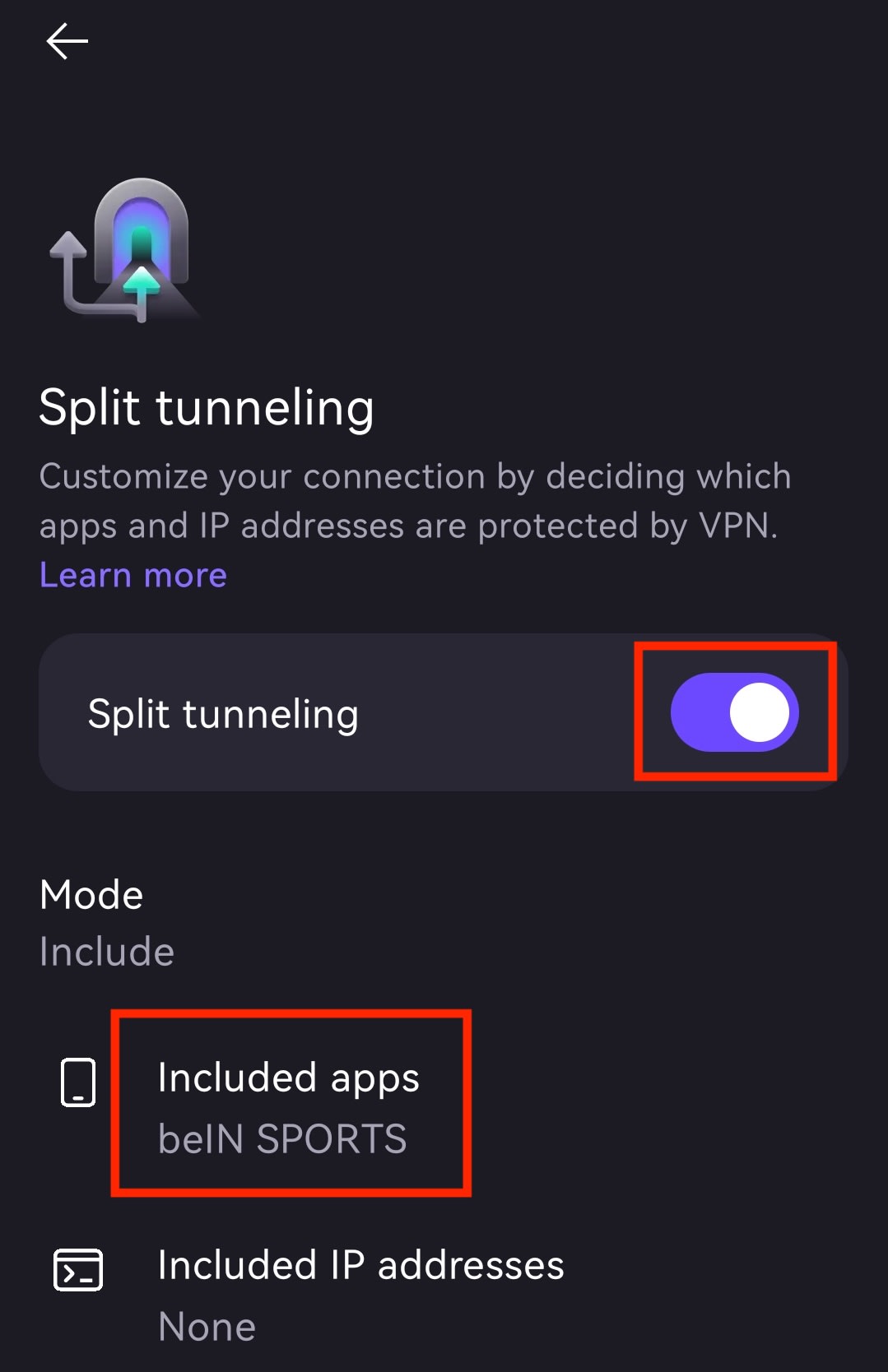
Ayrılmış tünelleme, hangi uygulamaların VPN kullanacağını ve hangilerinin normal internet bağlantınızı kullanacağını seçmenize olanak tanır. Örneğin, maç yayın akışınız VPN üzerinden bağlantı kurmaya devam ederken, telefonunuzun harita ve yemek siparişi uygulamaları yakındaki restoranları bulmak için yerel bağlantınızı kullanabilir.
Ayarlardan Ayrılmış Tünelleme özelliğini kullanıma alabilirsiniz. Tarayıcınızda canlı Dünya Kupası maçlarının yayın akışı izlemek için bir işlem gerçekleştiriyorsanız, yayın akışı izlemek için bir tarayıcı kullanıp bunu dahil edilen uygulamalar listesine ekleyebilir, normal gezinme için ise VPN dışındaki başka bir tarayıcıyı kullanabilirsiniz. Ardından, değişiklikleri uygulamak için yeniden bağlantı kurun.
2026 Dünya Kupası yayın akışını her yerden izleyin
Güvenilir bir bağlantı, maçı hangi kanalın yayınladığını bilmek kadar önemlidir. Güvenli bir bağlantıyı maç günü kurulumunuzun bir parçası haline getirerek, yayın akışınız turnuva boyunca güvenli ve istikrarlı kalır. Böylece, yurt dışına seyahat ederken bile favori takımınızı kendi dilinizde, tıpkı evinizdeymiş gibi izleyebilirsiniz.
Tüm aygıtlarınızda hızlı ve gizlilik odaklı bir bağlantı istiyorsanız, açılış düdüğü çalmadan önce Proton VPN indirin.
Dünya Kupası canlı yayın akışı izlemek hakkında sıkça sorulan sorular
Geleneksel bir ücretli TV paketiniz yoksa canlı TV yayın akışı izlemek için kullanılan platformlar aracılığıyla maçlara erişim sağlayabilirsiniz. ABD’de YouTube TV, Fubo, Sling TV ve Hulu + Live TV gibi hizmetler gerekli ağ kanallarını sunmaktadır. Kanada’da ise TSN ve RDS dijital platformları aracılığıyla maçların yayın akışını izleyebilirsiniz.
Evet. FOX Sports ve FS1, Amerika Birleşik Devletleri’nde turnuvanın İngilizce yayınlarını gerçekleştirecektir. İspanyolca yayınlar ise Telemundo ve ilgili NBCUniversal platformları üzerinden yayınlanacaktır.
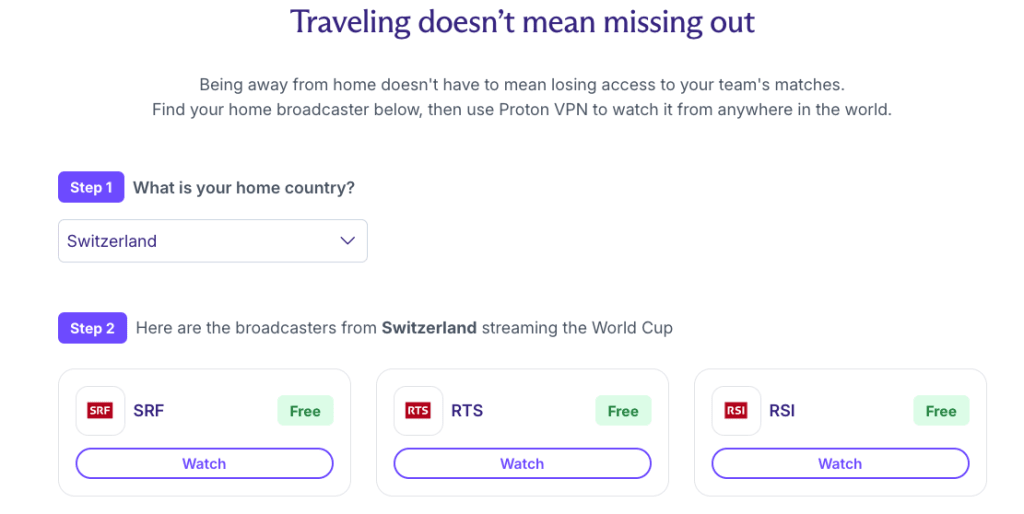
Maçları yerel resmi yayıncınızın televizyonundan veya belirlenen yayın akışı izlemek için geliştirilen uygulamaları üzerinden izleyebilirsiniz. Ülkenizde sunulan resmi yayın akışı seçeneklerini bulmak için bu kılavuzun üst kısmındaki yayıncı tablosunu kontrol edin.
İngilizce yayın akışları, FOX ve FS1 kanallarını sunan canlı TV yayın akışı hizmetleri aracılığıyla veya desteklenen bir TV sağlayıcı oturum açma bilgileriyle FOX Sports platformları üzerinden izlenebilir. İspanyolca yayınlar ise Peacock üzerinden de yayın akışı ile sunulacaktır.
Tüm turnuva için tek bir küresel uygulama bulunmamaktadır. Bunun yerine, bölgenizdeki yayıncının resmi uygulamasını kullanın. Birleşik Krallık’ta BBC iPlayer, ABD’de FOX Sports veya Peacock ve Avustralya’da SBS On Demand buna örnek olarak gösterilebilir.