


How to install Proton VPN on Debian and Ubuntu
- 읽기
- 4분
- 카테고리
- Linux
Proton VPN offers a Linux GUI app (with a graphic user interface) and a Linux CLI (command-line tool). These are officially supported on the latest stable Debian version and the latest stable Ubuntu version running the GNOME desktop environment. They should also work with most distributions based on Debian or Ubuntu (not Ubuntu Server or Raspbian), but these are not officially supported.
- Other ways to use Proton VPN on Linux
- How to use the Proton VPN Linux GUI app
- How to use the Proton VPN CLI
In this support guide, we show you how to install Proton VPN on Debian and Ubuntu using our official repositories. These instructions install both the Linux GUI app and Linux CLI. Note that you can’t run the GUI app and the CLI at the same time.
- How to install Proton VPN
- How to enable the system tray icon (GUI only)
- How to enable split tunneling (Debian, GUI only)
- How to disable the kill switch if you have uninstalled Proton VPN
- How to use our beta Linux GUI app and CLI
- How to uninstall the GUI app and CLI
Also available as a Snap package
For added convenience, a Snap package is also available for one-click installation on Ubuntu and other Snap-enabled Linux distributions. Please note, however, that Snap’s security sandboxing means the Snap version doesn’t include all features available on our native app.
How to install Proton VPN
1. Open a terminal window.
2. Download the package that contains the repository configuration and keys required to install the Proton VPN GUI app and CLI. Run:
wget https://repo.protonvpn.com/debian/dists/stable/main/binary-all/protonvpn-stable-release_1.0.10_all.deb
3. Check the repo package’s integrity (optional). Verify its checksum with the following command:
echo "c8a9fffb4ebdd63db08ce7f11c9b0ac394064ae6a210feb9ab63a0f7d8d060a7 protonvpn-stable-release_1.0.10_all.deb" | sha256sum --check -
Please don’t try to check the GPG signature of the release package itself (dpkg-sig –verify). Our internal release process is split into several parts. The release package is signed with a GPG key, and the repo is signed with another GPG key,so the keys don’t match.
4. Install the Proton VPN repository containing the GUI app and CLI. Run:
sudo dpkg -i ./protonvpn-stable-release_1.0.10_all.deb && sudo apt update
5. Run the following command to install both the GUI app and the CLI. Please note you can’t run both at the same time.
sudo apt install proton-vpn-gnome-desktop
How to enable the system tray icon (optional)
The system tray icon is only available while running the GUI app (not the CLI). By default, the GNOME desktop doesn’t support tray icons. To enable the ray icon:
Debian
1. Run:
sudo apt install gnome-shell-extension-appindicator gnome-shell-extension-prefs
2. Restart your computer.
3. Open the Extensions app and ensure that System Extensions → Ubuntu AppIndicators is toggled on before launching the app.
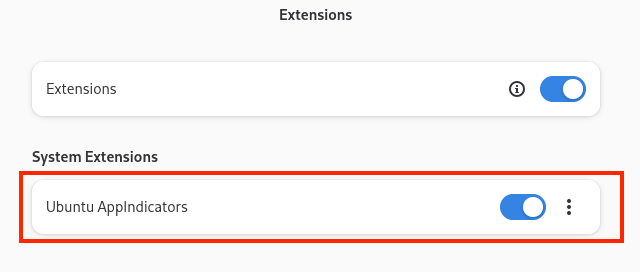
Ubuntu
1. Run:
sudo apt install gnome-shell-extension-appindicator gnome-shell-extension-prefs
2. Restart the Proton VPN app (if it was already running).
How to enable split tunneling (Debian, GUI only, optional)
Split tunneling is enabled automatically on the GUI app on Ubuntu. However, because it is designed to keep dependencies to a minimum, it is not available by default on Debian. To enable it:
1. Install kernel headers for your current kernel. Run:
sudo apt install linux-headers-$(uname -r)
2. Install systemd-resolved. Run:
sudo apt install systemd-resolved
Restart your system. Split tunneling should be available in the app settings.
A warning about using pip and PyPI
How to disable the kill switch if you have uninstalled Proton VPN
You can easily turn off the kill switch inside our GUI app or CLI , but this isn’t possible if you’ve already uninstalled Proton VPN. In this case, you can remove the kill switch and restore access to the internet as follows:
Identify the Proton VPN connection name with the command:
nmcli connection show --active
This will show a list of your system’s active connections.
2. Look for any connections that begin with prefix pvpn-. This usually includes pvpn-killswitch and pvpn-ipv6leak-protection, and may include pvpn-routed-killswitch. Delete all these connections using the following command:
nmcli connection delete [connection name]
For example:
nmcli connection delete pvpn-killswitch
3. Re-run the following command to check that all Proton VPN connections have been removed:
nmcli connection show --active
If you see any Proton VPN connections left, delete them as described above.
How to use our beta Linux GUI app and CLI
The beta versions of our GUI app and CLI give you access to new features before they are released publicly, but they are still in development. By using the beta versions and sharing your feedback, you can help us find and address bugs.
If you already have Proton VPN installed, simply open the GUI app and go to Settings and toggle the Beta access switch on.

If you haven’t installed Proton VPN yet, you can either install it and then enable beta access in the GUI app (as above). Or you can install Proton VPN beta directly. This installs both the beta GUI app and the CLI. Please note you can’t run both at the same time.
Open a terminal window and run the following commands:
wget https://repo.protonvpn.com/debian/dists/unstable/main/binary-all/protonvpn-beta-release_1.0.10_all.deb
echo "c8986b908898d06f9bdd3660718f1087282409a62c8d9059f67fc78b263bc6fb protonvpn-beta-release_1.0.10_all.deb" | sha256sum --check
sudo dpkg -i ./protonvpn-beta-release_1.0.10_all.deb && sudo apt update
sudo apt install proton-vpn-gnome-desktop
How to uninstall Proton VPN
Run:
sudo apt autoremove proton-vpn-gnome-desktop && sudo apt purge protonvpn-*-release