


Cara membuka blokir BBC iPlayer dengan Proton VPN
- Membaca
- 2 mnt
- Kategori
- Panduan streaming
BBC iPlayer adalah layanan streaming video daring milik BBC. Layanan ini bebas iklan dan memungkinkan penonton menyaksikan acara BBC terbaru yang mungkin terlewatkan.
Pengguna Proton VPN dapat menonton semua acara BBC favorit di BBC iPlayer di mana pun berada!
Namun, menonton versi asli dari The Office bukan satu-satunya hal yang dapat ditonton dengan Proton VPN. Layanan ini juga dapat digunakan untuk melakukan stream Disney+, Max, Netflix, dan Amazon Prime Video. Lihat semua layanan streaming yang dapat diakses dengan panduan streaming bagi pengguna baru.
Untuk mengakses BBC iPlayer:
Hubungkan ke salah satu dari server Plus di Inggris Raya.
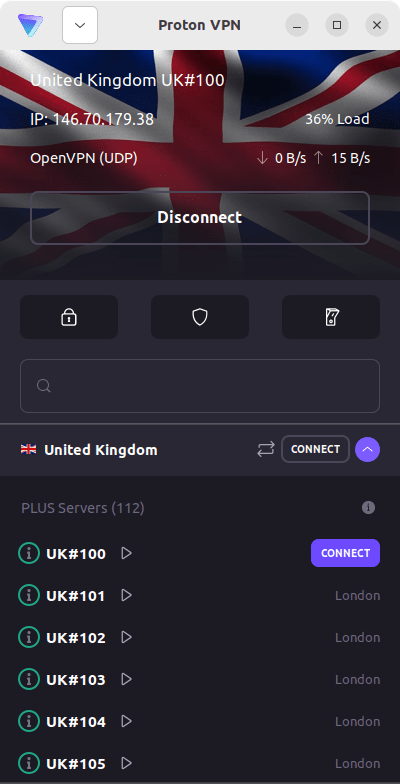
Pada aplikasi Android TV, memilih negara apa pun akan secara otomatis menghubungkan ke server Plus di negara tersebut jika memiliki langganan yang sesuai.
Server Plus tersedia untuk paket Proton VPN Plus, Unlimited, Visionary, atau paket keluarga apa pun (Duo, Family).
Proton VPN tidak membenarkan penggunaan layanan VPN untuk melanggar regulasi hak cipta.
Langkah 1:
Dapatkan langganan VPN Plus atau Proton Unlimited
Jika sudah memiliki akun VPN Plus, Proton Unlimited(jendela baru), Duo, Family, atau Visionary (khusus pengguna sistem lama), langkah 2 dapat dilewati.
Bagi pengguna baru, silakan mendaftar Proton VPN.
Jika sudah memiliki paket Free, tingkatkan akun dengan masuk dan memilih VPN Plus atau Proton Unlimited dari halaman Langganan akun.
Langkah 2:
Beli lisensi TV Inggris Raya
Jika sudah memiliki lisensi TV Inggris Raya, langkah 3 dapat dilewati.
Untuk menonton BBC iPlayer menggunakan VPN, diperlukan lisensi TV Inggris Raya yang valid. Siapa pun yang ingin melakukan stream konten di BBC iPlayer akan memerlukan lisensi TV Inggris Raya. Lisensi standar berlaku selama setahun. Jika ada pertanyaan mengenai perlu tidaknya lisensi TV atau cara membayar lisensi tersebut, situs web TV Licensing(jendela baru) merupakan sumber informasi yang bermanfaat.
Langkah 3:
Instal aplikasi VPN
Silakan unduh aplikasi Proton VPN untuk sistem operasi yang digunakan. Lakukan stream acara favorit dengan aman di perangkat Windows, macOS, Linux, Android TV, Apple TV, atau saat bepergian dengan perangkat Android atau iOS.
- Unduh aplikasi Proton VPN Windows(jendela baru)
- Unduh aplikasi Proton VPN macOS(jendela baru)
- Unduh aplikasi Proton VPN untuk Linux(jendela baru)
- Unduh aplikasi Proton VPN untuk Android(jendela baru)
- Unduh aplikasi Proton VPN untuk iOS(jendela baru)
- Unduh Proton VPN untuk Android TV(jendela baru)
- Unduh Proton VPN untuk Apple TV(jendela baru)
Untuk bantuan instalasi, berikut adalah panduan dukungannya:
- Panduan dukungan Windows
- Panduan dukungan macOS
- Panduan dukungan Linux
- Panduan dukungan Android
- Panduan dukungan iOS
- Panduan dukungan Android TV
- Panduan dukungan Apple TV
Langkah 4:
Mulai menonton BBC iPlayer dengan aman menggunakan Proton VPN!
Hubungkan ke server Plus di Inggris Raya, masuk ke BBC iPlayer, lalu bersantailah.
Jika mengalami isu saat menonton BBC iPlayer, silakan coba langkah berikut:
- Mulai ulang aplikasi Proton VPN dan koneksi VPN
- Bersihkan tembolok peramban
- Gunakan peramban lain
- Mulai ulang perangkat
- Bersihkan tembolok DNS
BBC iPlayer mungkin tidak selalu berfungsi. Jika telah mencoba semua opsi yang ada dan masih mengalami isu, silakan periksa Panduan penyelesaian masalah streaming atau hubungi tim Dukungan.