


How to quickly connect to Proton VPN through System Tray option
- وقت القراءة
- 1 min
- Category
- Proton VPN apps
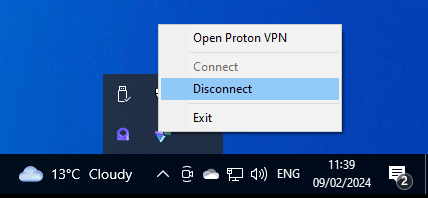
The Proton VPN icon in the Windows notification area serves as a shortcut to the application. To quickly establish a VPN connection, right click on the Proton VPN icon → Connect. This will connect you to the last server you previously connected to
Tip: When Proton VPN is minimized, you can also connect by using the Quick Connect button.
Related questions
How do I switch countries/servers?